
Selecting UVs, UV components, and UV shells is critical to editing the layout of UVs in the UV Texture Editor. You can select UVs in either the scene view or in the UV Texture Editor, but you can only view and edit the 2D representation of UVs using the UV Texture Editor.
To select UVs in the scene
 -click a polygon or subdivision surface mesh in your scene and select UV from the marking menu.
 UVs for the surface mesh display in exactly the same location as vertices, so you can select them in the scene view.
- Click individual UVs or drag a marquee to select multiple UVs at once.
The UVs are selected in the scene view. To view a 2D representation of the UVs you must open the UV Texture Editor (Edit UVs > UV Texture Editor).
To select UVs and UV shell components in the UV Texture Editor
-
 -click in the UV Texture Editor's 2D view and select a component mode from the marking menu.
 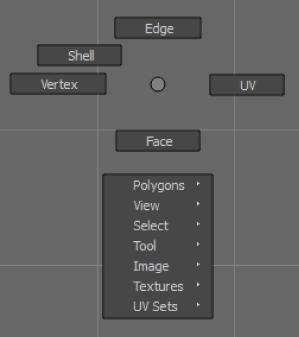 Tip: Press f in the UV Texture Editor to frame any selected items in the 2D view.
 - Select components in the 2D view.
To select a UV edge loop
- Double-click a single edge.
The entire edge loop is selected.
A UV edge loop is an edge loop that is bounded by UV boundaries rather than edge boundaries.
To convert an existing UV selection to another type
- In the UV Texture Editor, make a selection.
 + -click and select one of the following options:
 - To Edge, To UV, To Face, To Vertex: Converts the selection from one component type to another connected type. For example, if you have faces selected and then convert the selection to vertices, all vertices connected to the faces are now selected.
- To Shell: Selects all UVs in the shell containing the current selection.
- To Edge Loop, To UV Edge Loop: Selects the edges or UVs associated with the original select and then extends the selection of edges/UVs as a loop in either direction along the mesh.
- To Shell Border: Expands your selection to all UVs along the border of the shell.
 To Edge Perimeter, To Vertex Perimeter, To UV Perimeter: Converts the selection to edges, vertices, or UVs around the selection's perimeter.
Soft selecting UVs
You can use Soft Selection to smoothly transform textures on your models without transforming each UV one at a time. Soft selection works by transforming a falloff region around your selected region. For more information see Soft Selection overview.