Add a gate to the runner you created in the previous task.
Before inserting a gate, you must specify the gate properties.
- Click
 to open the Geometry tab.
 - Click
 and select
  Gate Properties from the Defaults drop-down list. The Gate properties pane appears.
 - Select Cold in the Gate type drop-down list and Circular Tapered in the Gate shape drop-down list.
- Enter a Start diameter (1) of 4 mm.
Note: The start diameter is the size of the gate on the runner side of the feed system. The end diameter is the size of the gate on the cavity side of the feed system.
- Enter an End diameter (2) of 2 mm.
- Select Horizontal by length from the Orientation drop-down list.
- Click OK.
- Click
 and deselect Injection Cones from the Object Visibility drop-down menu.
This will hide the injection location, which will make it easier to create the gates.
- Click and deselect Runner Intersections from the Object Visibility drop-down menu.
This will hide the intersections, which will make it easier to create the gates.
- Click
 . The Create gate pane appears.
 - Select Injection Location 1 from the Select drop-down list in the Injection location section.
- Select Defined by coordinate and move the cursor over the design grid. A thin yellow line is drawn from the injection location to the grid point nearest to the cursor. A small yellow sphere indicates the end point of the gate.
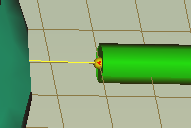
- Click the end of the runner. The gate has been created.
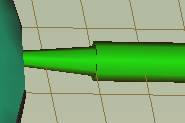
- Right-click on the grid and select Finish Create Gate from the menu, or click OK on the Create Gate pane.
- Rotate the model and examine the sprue, runner and gate system you have created in this tutorial.
- Click and select Runner Intersections from the Object Visibility drop-down menu to show a different representation of the feed system.