- Open a model.
- Click
 (). Look under
Intersection Details
for information about Element Intersections and Fully Overlapping Elements. These are defects in the mesh that you need to fix before running an analysis.
(). Look under
Intersection Details
for information about Element Intersections and Fully Overlapping Elements. These are defects in the mesh that you need to fix before running an analysis. - Click
 (), to fix overlaps and intersections where possible. Don't worry about the result, because the tool reports aspect ratios before and after this will change only if the fixed defect happens to be related to the minimum or maximum aspect ratio.
 - Check Mesh Statistics again to see if Auto Repair solved your element problems.
- Display the overlapping elements and manually fix the mesh. To display these elements, click
 (). On the dialog that appears, select Find overlaps, Find intersections or both. Be sure to select Place results in diagnostic layer. Click Show, and then Close once the diagnostics has finished.
 - Deselect all layers so only the Diagnostic Results layer is visible. Click on the Diagnostic Results layer to highlight it, then click Expand. The mesh around the highlighted layer is expanded by a specified level, in this case 1. This feature allows you to see what elements need to be fixed and the area around them.
- Use
 Zoom Window to focus on one particular area, and use
  Center to center the view for ease of rotation. There are many ways to fix overlaps and intersections. In the example below, the problem element is protruding through other mesh elements. You can select and delete this element using
  () or click
  Select, select the element, and press Delete on your keyboard.
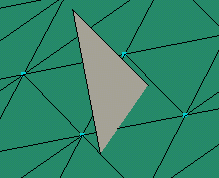
- Use
 () to clean up any disconnected nodes that may have been created during the cleanup operations.
Note: Another common way to fix overlapping elements is to merge nodes  (). Select the node(s) you want to merge to and then the node(s) you want to be merged.
(). Select the node(s) you want to merge to and then the node(s) you want to be merged.