Administrators can customize properties in the AutoCAD configuration file so that AutoCAD DWG Properties automatically sync with Vault properties.
DWG Properties sync based on a PropertyDefinition attribute called SyncDWGProperty. This attribute defines whether DWG properties are synced or created with the value entered in the Data Standard dialog.
The properties are defined in C:\ProgramData\Autodesk\Vault 2015\Extensions\DataStandard\CAD\Configuration\AutoCAD.cfg.
Note: See Modify the CAD Configuration File for Data Standard for more information about property definitions and the AutoCAD configuration file.
SyncDWGProperty Attribute
The SyncDWGProperty attribute is boolean and is used in combination with most Standard DWG Properties.
<?xml version="1.0" encoding="utf-8"?>
<Configuration>
  <PathDefinition>{Workspace}\{Prop[Folder].Value}</PathDefinition>
  <FileNameDefinition>{Prop[GEN-TITLE-NR].Value}</FileNameDefinition>
  <PropertyDefinitions>
    <PropertyDefinition PropertyName="GEN-TITLE-NR" DataType="Text" InitialValue="{PathAndFileNameHandler.FileName}" />
    <PropertyDefinition PropertyName="GEN-TITLE-DES1" DataType="Text" RequiresValue="true" />
    <PropertyDefinition PropertyName="GEN-TITLE-DES2" DataType="Text" />
    <PropertyDefinition PropertyName="Folder" DataType="Text" InitialValue="Assemblies" RequiresValue="true"/>
    <PropertyDefinition PropertyName="Comments" DataType="Text" SyncDWGProperty="true"/>
  </PropertyDefinitions>
  <TitleBlock>ISO_TITLEA</TitleBlock>
</Configuration>
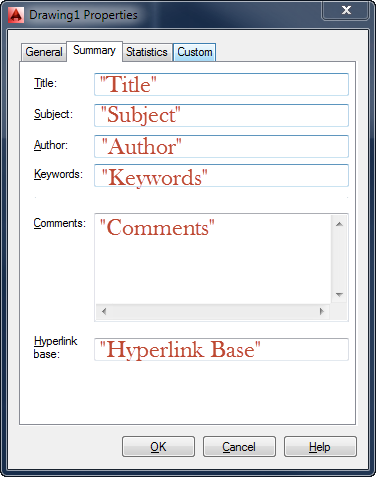
Standard DWG Properties
- "Title"
- "Subject"
- "Author"
- "Keywords"
- "Comments" (see the preceding code sample)
- "Hyperlink Base"
- "Revision Number"
Note: These property names are not case-sensitive.
A DWG property cannot be mapped to a custom property with the same name.
If these properties are used in the Data Standard datasheet, the values appear in that dialog.
Behavior
- If the SyncDWGProperty attribute does not exist for a property definition or is set to false, DWG properties are not synced.
- If the SyncDWGProperty attribute is set to true:
- If a DWG property with that name doesn't exist yet, it is created and filled with the value entered in the Data Standard dialog.
- If a DWG property with that name already exists, the value is overridden with the value entered in the Data Standard dialog.
- If a defined property is synchronized with a matching block attribute, the property is also synchronized with the DWG property.
- When the Data Standard dialog is shown (e.g., Edit Datasheet), the current DWG property is displayed.