Autodesk Data Standard for Vault 2015 R2 focuses on providing support for Autodesk Vault Workgroup 2015 R2 and Autodesk Vault Professional 2015 R2. In addition, Autodesk Data Standard for Vault 2015 R2 provides a unique XAML file for the Vault Office client, allowing administrators to provide separate data standard dialog experiences for Vault client and Vault Office client users. The Data Standard for Vault 2015 R2 also introduces numbering scheme support.
Vault Office Client Support
The Vault Office client provides many of the same features as the Vault Client, but is slimmed down to focus on non-CAD design data management processes. With Autodesk Data Standard for Vault 2015 R2, administrators can modify a separate XAML file called FileOffice.xaml to provide customized data sheets unique to the Vault Office client and non-CAD work processes.
Vault Office users can create new files based on established templates and edit existing data sheets for non-CAD files.
New Vault Office Data Standard Templates
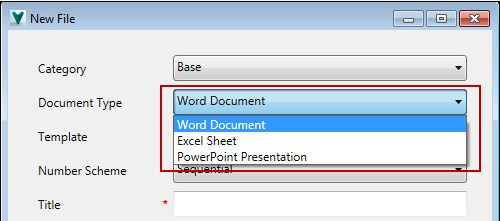
- Word Document
- Excel Sheet
- PowerPoint Presentation
Autodesk Data Standard for Vault 2015 R2 provides three out-of-the-box templates for Vault Office clients.
New Properties for Vault Office Client
-
IsOfficeClient
Returns "True" if running in Vault Office Client.
-
IsNotOfficeClient
Returns "True" if running a client other than the Vault Office client, such as the Vault Professional Client.
-
IsCADFile
Returns "True" if the context file is a CAD document.
-
IsNonCADFile
Returns "True" if the context file is a non-CAD document.
Administrators can use the following properties in a XAML file to implement special behavior for data sheets in the Vault Office Client.
See Configure Data Standard for Vault Office for more information.
Numbering Scheme Support
Autodesk Data Standard for Vault 2015 R2 introduces numbering scheme support for the Vault client and the Data Standard Add-ins.
- Default dialogs for the Vault client and Vault add-ins now include the option to select a numbering scheme.
If the numbering scheme requires that the user select a prefix or a suffix, or that the user enter any number data, the Number field allows for this sort of flexibility, as shown in the New File dialog for the Data Standard add-in.
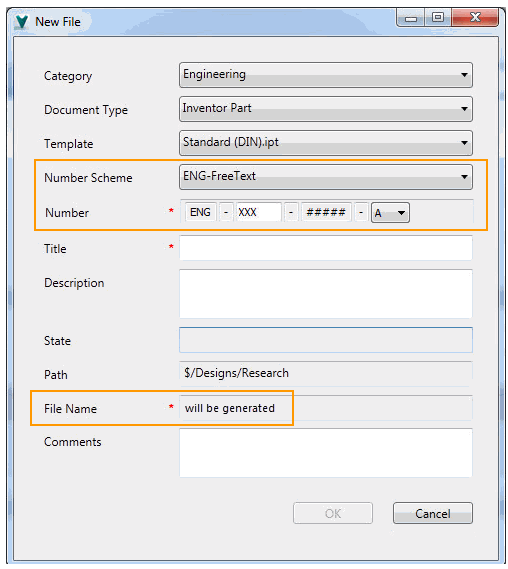 Note: If no numbering schemes are available, the File Name field can be edited.
If no Prefix or Suffix selection is required, the user can preview the filename in the Number field.
The file name is generated when all required fields are filled and the user clicks OK.
- The Generate File Number dialog for new files in the Vault add-ins no longer displays when a new file is created. Instead, the user provides the numbering scheme information on the New File Data Standard dialog.
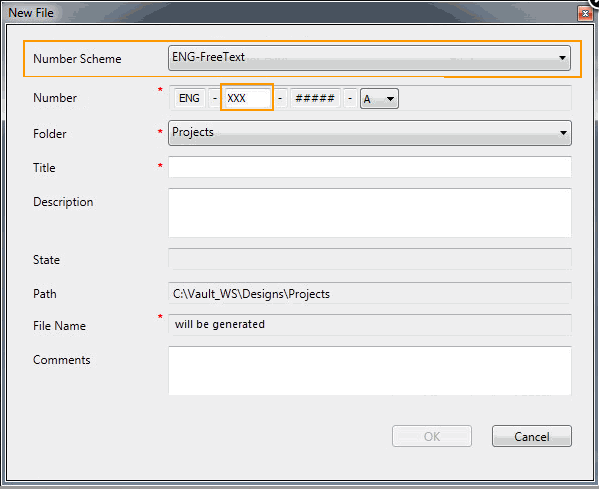
See Using Data Standard with Add-ins for more information.
- The Generate File number dialog is suppressed now for new generated Inventor Components. Instead, the user provides the numbering scheme information on the New Files dialog for that component.
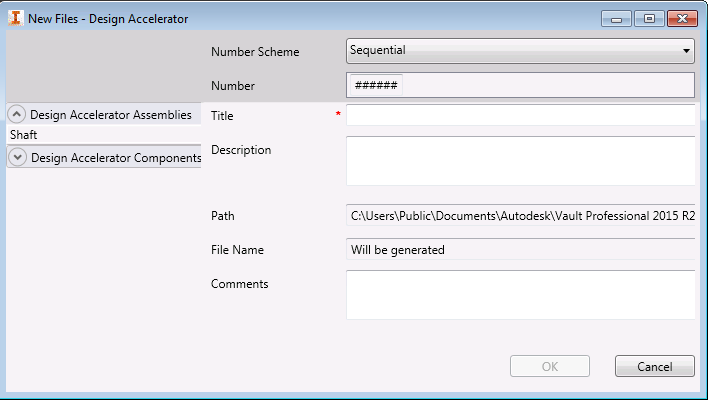
The selected numbering scheme is used for all documents listed in the New Files dialog.
Note: See Data Standard for Generated Inventor Components for more information. - A new DSNumSchemeCtrl XAML control has been added to the XAML files. Administrators can use this control to provide numbering scheme support on Data Standard dialogs for the Vault Client, Inventor Vault Add-in, and AutoCAD Vault add-in. Note: See Use Numbering Schemes with the Data Standard Dialog for more information.