After selecting Parameters from the left panel of the Table printout manager dialog, the right part of the dialog displays as shown, containing all the variables defined in the system and their values.
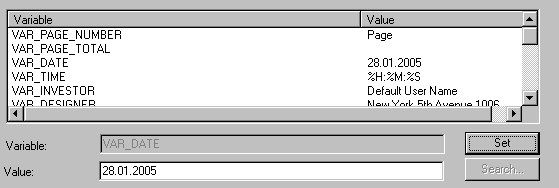
Use variables to format a printout header and footer:
VAR_PAGE_NUMBER - variable that allows assigning the current printout page. The total number of pages will be preceded by the text ascribed to the variable if the VAR_PAGE_TOTAL variable is used (for example, if you specify the value as "Page VAR_PAGE_NUMBER ", each page will be printed using the format Page 1, Page 2).
VAR_PAGE_TOTAL - value of this variable indicates the total number of printout pages. The text assigned to it may be preceded with a number of the current page if the VAR_PAGE_NUMBER variable is used.
VAR_DATE, VAR_TIME - these variables may be assigned any text and a combination of the following key words in order to include the current date/time on a printout:
%A - full name of a week day (Monday)
%a - abbreviated name of a week day (Mon)
%B - full name of a month (January)
%b - abbreviated name of a month (Jan)
%c - standard representation of a date and time
%d - day of a month (01-31)
%H - time (24-hour clock) (00-23)
%I - time (12-hour clock) (00-12)
%j - day of a year (001-366)
%M - minute (00-59)
%m - month (01-12)
%p - local equivalent of the English abbreviations AM / PM
%S - second (00-59)
%U - week of a year (first day - Sunday) (00-53)
%W - week of a year (first day - Monday) (00-53)
%w - day of a week (0-6, Sunday is denoted by 0)
%X - standard representation of time
%x - standard representation of a date
%Y - year and century
%y - year without the century (00-99)
%Z - name of a time zone
%% - percent mark
Standard date representation is the following string of variables: %a %b %d %Y
Standard time representation is the following string of variables: %H:%M:%S
Standard date and time representation is the following string of variables: %a %b %d %H:%M:%S %Y.
The remaining variables contain only text that you ascribe to them. Their names are used only for convenient classification while formatting a printout. The following user-defined variables are available in AutoCAD® Structural Detailing - Formwork Drawings:
VAR_INV_NAME - investor’s name
VAR_INV_ADDRESS - investor’s address
VAR_INV_PHONE - investor’s phone
VAR_INV_FAX - investor’s fax
VAR_INV_EMAIL - investor’s e-mail address
VAR_OFF_NAME - name of a design office
VAR_OFF_NAME - name of a design office
VAR_OFF_PHONE - design office phone
VAR_OFF_FAX - design office fax
VAR_OFF_EMAIL - design office e-mail address
VAR_SCALE - drawing scale
VAR_DRAW_NAME - drawing name
VAR_FILE - name of a DWG file including a drawing
VAR_DESIGNER - designer
VAR_VERIF - verification
VAR_PROJ_NAME, VAR_PROJ_NUM
VAR_REV_NAME, VAR_REV_NUM
VAR_LOGO - access path to a *.bmp file.
You can use these variables when creating your own printout layouts. The software will automatically fill out variables with values specified in the table printout manager.