Access this option by clicking  , the Reinforcement - point dialog displays:
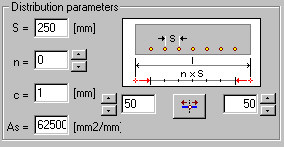
The left side of the dialog contains the parameters controlling reinforcement distribution within one zone:
- S - reinforcement spacing
- n - number of spacings between bars in a given zone
- c - distance (cover) between bars and reinforcement or polylines along which reinforcement is distributed (the default value equals zero). The cover is always interpreted as perpendicular to a bar or formwork line.
- As - area of reinforcement per length unit.
A drawing of reinforcement distribution is provided, whereas directly underneath, the options that allow positioning displays.
The following methods of reinforcement distribution are available:
 - along the whole indicated bar
  - along the whole indicated segment of a bar
  - along the fragment of the indicated bar segment
  - along the indicated polyline (arc, circle, line i.e. between 2 points).
When defining the distribution applying the methods 1 or 2, you should indicate a bar or segment of reinforcement; the cursor assumes the shape of a square. After selection, and initial positioning of reinforcement (according to the distribution parameters defined in the dialog), you specify (by means of the options available in the command line) the followimg parameters:
- Change of the side on which the distributed reinforcement is positioned - with respect to the bar (the Side command)
- Change of the parameter spacing / number (the Spacing / Number command)
- Justify - positioning the distribution centrally or justified to the left or right side of the distribution
- Adjust - uniform distribution of reinforcement along the whole distribution length
- Cover - change of a cover value = offset.
If distribution is defined by means of method 3, the extreme points are specified. In the case of distribution defined with the use of method 4, reinforcement is distributed on the whole selected objects such as line, polyline, circle.
You may change values of the parameters using the options available in the dialog, however, the side on which reinforcement is positioned cannot be changed.
The method of reinforcement distribution consists in specifying the number of reinforcing bars/spacing or reinforcement area per one running meter. Hooks are not considered in case of distribution along the bar. For distribution along the segment, the length between fillets is taken into account.
Command line (regular distribution)
Distribution type: [Regular / Automatic / Any] Regular
Regular
Select Bar or [Segment / Segment fragment / Polyline]
Bars
Select bar or [Side / Back ]
Segment
Select bar segment or [Side / Back ]
Segment fragment
Select bar segment
Select beginning point or [Back]
Select end point or [Side / Back]
Polyline
Select object or [Side / Back]