Use this option to define distribution of reinforcing bars in an element of an RC structure. There are several ways to access this option:
- Menu: Reinforcement > Reinforcement - point
- Ribbon: ASD - Reinforcement > Reinforcement - definition > Reinforcement - point
- Toolbar: Definition - bars > Reinforcement - point

- Command line: RBCR_DISTRIBUTION_POINT.
The dialog displays if reinforcement has been selected or if a number of a reinforcement positions have been specified in the command line (by default, the number of the recently-defined bar is suggested):
- If Main Reinforcement has been selected, the following data displays:
- diameter,
- position number,
- appropriate bar length.
- If Distributed Reinforcement has been selected, the following data displays:
- diameter,
- position number (both parameters are not accessible),
- edit field (used for definition of the reinforcement length).
The dialog is opened automatically from the level of the dialog for reinforcement distribution. Then the dialog opens in the mode of main reinforcement definition with an appropriate diameter, position number, and appropriate bar length (the parameters are not accessible).
After selecting the option, the following dialog displays:
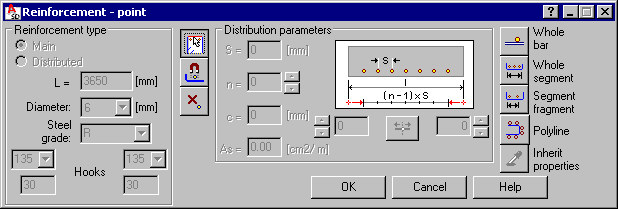
The above dialog is divided into three principal parts:
- The left side of the dialog (the Reinforcement type field) contains basic information concerning the reinforcement:
- Reinforcement type: main, distributed
- Edit field where reinforcement length can be defined
- Reinforcement diameter
There is also information concerning hooks on ends of a reinforcing bar (beginning and end of a bar).
- The middle of the dialog includes three icons, which when clicked, change the content of the Distribution parameters field with parameters of reinforcement distribution:
 - regular distribution of reinforcement
  - automatic distribution of reinforcement
  - any distribution of reinforcement Note: The Automatic and Any distribution of reinforcement parameters are coupled. Regular distribution of reinforcement cannot be combined with Automatic or Any distribution of reinforcement.
 - The right side of the dialog provides a group of icons which are used for selecting the graphic definition mode; clicking these icons activate different modes of graphic interface.
The dialog remains visible throughout the process of defining reinforcement distribution, which enables you to change the distribution parameters of reinforcement while defining it. All methods of bar distribution are applied with respect to one reinforcement position.
The distribution of a given reinforcement position is completed by clicking OK. Afterwards, the distribution description is defined.
See also: