After clicking  , the Reinforcement - point dialog displays:
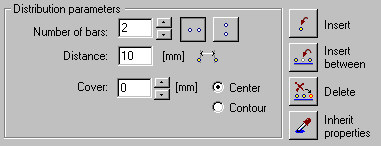
The distribution method is intended for all cases where standard methods of reinforcement distribution prove ineffective. This method allows you to position a bar or a bar group freely, based on the distribution carried out earlier; the distribution may also be defined independently. The method described enables distribution of one or more bars simultaneously. For at least two bars that are inserted concurrently, you can determine the distance between bars and their orientation (horizontally  or vertically
  ) while inserting. Precise arrangement of bars are facilitated by the use of characteristic points (characteristic points of AutoCAD®).
For bars defined as vertical, and when applying points characteristic for reinforcement, bar orientation will always be perpendicular to the bar / segment axis.
The right side of the dialog contains the following distribution methods:
-
 Insert This options allows you to define the distribution; the definition consists of successive positions of reinforcement. The only assistance available while defining distribution is offered the characteristic points - snap points within AutoCAD®. Distribution may also be defined from the level of the command line.
 -
 Insert between The option allows you to indicate two point bars and insert 1 bar or a group of bars between them. When inserting a bar, the order between the indicated bars changes; if the two selected bars had been inserted using the characteristic points, then the bars inserted should behave identically as base bars; if not, the bars added are inserted along a straight line between the existing bars.
 -
 Delete The option permits deleting an indicated bar.
Command line (any distribution)
Distribution type: [Regular / Automatic / Any]: Any
Select attachment point or [Modify properties / Insert between / Delete / Snap / Back]
Modify parameters [Number of bars / Spacing / Orientation]
Number of bars <2> : 1
Spacing <0.12> : 0.18
Orientation <V> : H
Insert Between
Select initial bar Select end bar or [Back ]
Delete
Select bar or [Back]