Use this dialog to specify parameters of section symbols and descriptions of views as they display in formwork drawings.
To display the Section / View - Parameters dialog:
- On the Drawing templates manager dialog, for Drawing components, select Section / View - Parameters
- Click New or Modify.
For Style name, enter a name for the component style, and click Save (this is only available when creating a style, not when modifying an existing style).
For Element type, select a structure element type (such as beam, column, or spread footing) for which parameters of sections and views will be defined.
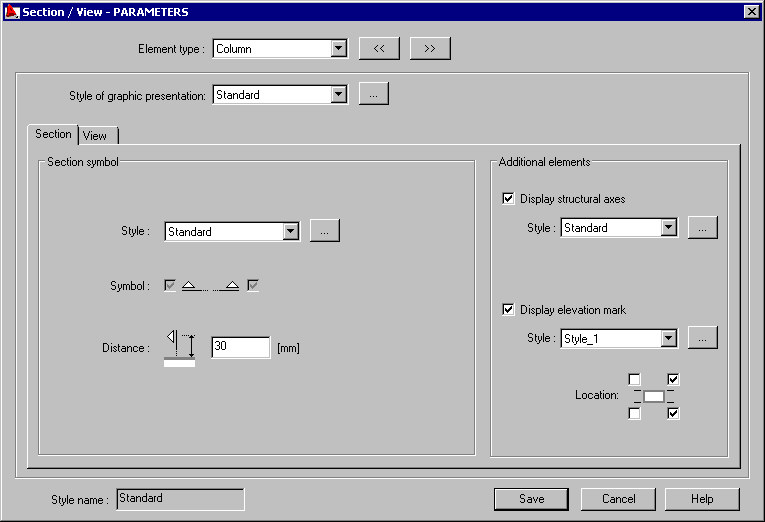
The dialog box consists of two tabs: Section and View.
In the upper part of the dialog, it is possible to select style of the graphic presentation of the graphic elements, according to which the edges of the elements will be drawn.
Options for the drawing of an element section are available on the Section tab:
- style - the list includes all the defined styles of section symbols. Click the Browse (...) button to open the Styles of symbols dialog, where you can select or modify an existing style of that symbol
- symbol - it switches on / off the symbol presentation of a section in the structure drawings
- distance - specifies a distance between the section symbol and the element contour
- structure axes - switches on / off the presentation of the structure axes and enables selection of the style of their presentation
- elevation mark - switches on / off the presentation of the structure axes and enables selection of the style of their presentation.
Options for the parametrization of view of the drawing element are available on the View tab:
- description components - define the syntax of a section description. Because a description may consist of 2 lines of text, there are 2 edit fields. Select a description component, click the arrow, and the selected description components are moved to the active edit field. A preview of the resulting syntax displays below the edit fields.
%El_name - element name (position name)
%Quant - quantity (number of positions)
%Scale - scale of the drawing of an element view
- description text - define the color, style, and size of description text
- description location - select from several description positions, and specify a distance between the description and the view drawing
- structure axes - switches on / off the presentation of the structure axes and enables selection of the style of their presentation
- elevation mark - switches on / off the presentation of the structure axes and enables selection of the style of their presentation.