新しい Data Standard 機能では、既定で Vault の $\Templates フォルダを対象にドキュメント テンプレートが検索されます。このパスは、Data Standard XAML ファイルで変更することができます。管理者は、アプリケーションごとに個別のテンプレート フォルダを指定することができます(たとえば、AutoCAD のテンプレート用のフォルダと Inventor のテンプレート用のフォルダを指定できます)。
動作
Data Standard の既定の[新規ファイル]ダイアログには、[ドキュメント タイプ]というコンボ ボックスがあります。
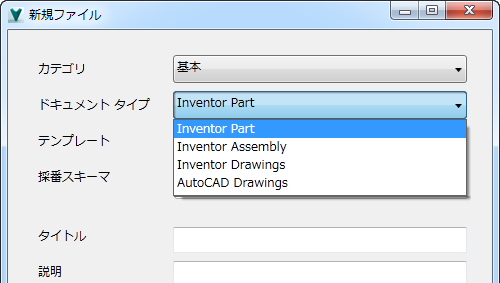
ユーザが[ドキュメント タイプ]リストからオプションを選択して[OK]をクリックすると、新しい Data Standard のファイル機能では、選択したドキュメント タイプに関連付けられた Vault フォルダのパスにあるテンプレートが検索されます。テンプレートは、新しいファイルの生成に使用されます。
[新規標準ファイル]ダイアログのテンプレート パスを設定する
Vault 内の別のテンプレート パスを指定するには、Data Standard XAML ファイルの次のセクションを修正します。
<?xml version="1.0" encoding="utf-8"?>
<WPF:MainWindow xmlns="http://schemas.microsoft.com/winfx/2006/xaml/presentation" xmlns:x="http://schemas.microsoft.com/winfx/2006/xaml" x:Name="MainWindow" xmlns:WPF="clr-namespace:CreateObject.WPF;assembly=CreateObject" AllowsTransparency="False" Background="#F0F0F0" MinWidth="500" MinHeight="518" MaxHeight="518">
    <Window.Resources>
        <!------------------------------------------------------------------------------------------------->
        <!-- This XmlDataProvider is used for defining Name/TemplatePath pairs that are used in the combo box "Document Type" and can be easily extended -->
        <XmlDataProvider x:Key="DocTypes"
                         XPath="/DocTypeData">
            <x:XData>
                <DocTypeData xmlns="">
                    <DocTypeInfo>
                        <Name>Inventor Part</Name>
                        <TemplatePath>$\Templates\Inventor\IPT</TemplatePath>
                    </DocTypeInfo>
                    <DocTypeInfo>
                        <Name>Inventor Assembly</Name>
                        <TemplatePath>$\Templates\Inventor\IAM</TemplatePath>
                    </DocTypeInfo>
                    <DocTypeInfo>
                        <Name>Inventor Drawings</Name>
                        <TemplatePath>$\Templates\Inventor\IDW</TemplatePath>
                    </DocTypeInfo>
                    <DocTypeInfo>
                        <Name>AutoCAD Drawings</Name>
                        <TemplatePath>$\Templates\AutoCAD</TemplatePath>
                    </DocTypeInfo>
                </DocTypeData>
            </x:XData>
        </XmlDataProvider>
        <!------------------------------------------------------------------------------------------------->
        ...
要素 <Name> では、[新規ファイル]ダイアログのコンボ ボックスに表示される値を定義します。要素 <TemplatePath> はユーザに表示されませんが、ビュー モデル内の "TemplatePath" の設定に使用されます。
[ドキュメント タイプ]コンボ ボックスの記述は次のようになります。
...
<Label Content="Document Type" Grid.Row="2" Grid.Column="0" />
<ComboBox ItemsSource="{Binding Source={StaticResource DocTypes}, XPath=DocTypeInfo}"
          Name="DocTypeCombo"
          Grid.Row="2"
          Grid.Column="1"
          IsEnabled="{Binding IsNewEntryDialog}"
          DisplayMemberPath="Name"
          SelectedValuePath="TemplatePath"
          SelectedValue="{Binding TemplatePath}"
          SelectedIndex="0"></ComboBox>
...
属性 DisplayMemberPath では、コンボ ボックスでの表示に使用されるデータ ソースの要素を定義します。この例では、"Name" に設定されています。
属性 SelectedValuePath では、使用するテンプレート パスとして設定されるデータ ソースの要素("TemplatePath")を定義します。
属性 SelectedValue="{Binding TemplatePath}" では、ビュー モデルで選択されたテンプレート パスを設定します。新しいバインド プロパティ "TemplatePath" はビュー モデルに追加する必要があります。