Allows you to modify the format and the layout of the revision table.
Command access
Select a revision table and access the properties:
- On the Tools tool palette: Click
 .
.
or
- Right click and select Advance Properties from the context menu.
Column tab
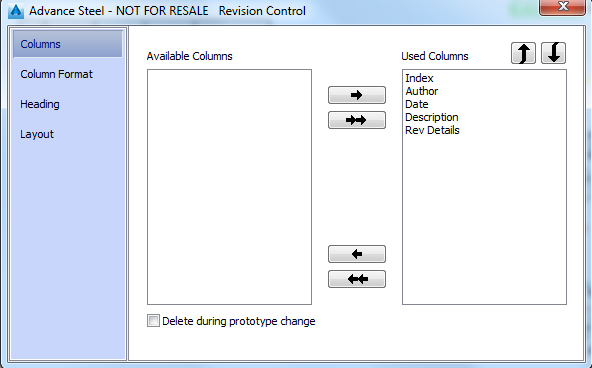
Allows you to select the columns displayed in the revision table and modifying their position within the revision table.
Available columns
Displays the list of the columns that may appear in the revision table.
Used columns
Displays the list of the columns that appear in the revision table. Use the arrows ( and
and  ) to change the position of the columns

|
Moves the selected column to the Used columns list |

|
Moves all columns to the Used columns list |

|
Removes the selected column from the Used columns list |

|
Removes all columns from the Used columns list. |
Column format and Heading tab
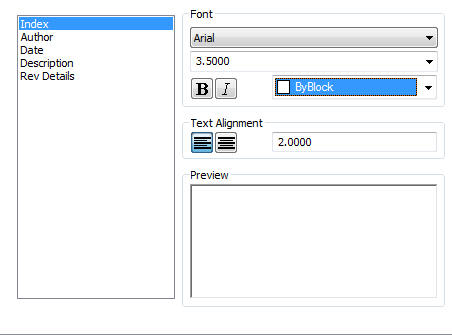
Allows setting up the text format for the heading and for the text that is displayed in the revision table.
The left side of the dialog box lists the columns of the revision table. Select the column for which you want to change the text formatting.
Font
Controls the appearance of the text displayed in the selected column.
Font list
Displays the list of the available font families.
Height
Sets the text height based on the selected value.

Turns bold formatting on and off for the text displayed in the selected column.

Turns italic formatting on and off for the text displayed in the selected column.
Color
Specifies a color for the text displayed in the selected column.
Text alignment
Controls the alignment of the text displayed in the selected column.
Preview
Displays a preview of the selected formatting options.
Layout tab
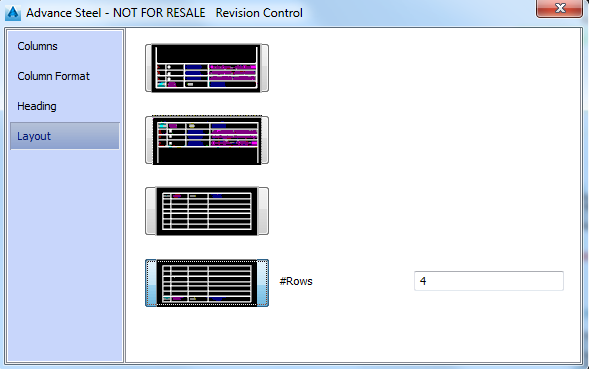
Allows you to define the number of rows and the heading position in the revision table.
|
Button |
Description |
|
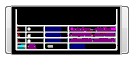
Places the heading at the bottom side of the revision table. |
|
Places the heading at the top side of the revision table. |
|
Places the heading at the top side of the revision table. Additionally, the number of rows can be specified. |

|
Places the heading at the bottom side of the revision table. Additionally, the number of rows can be specified. |