This dialog box allows you to manage the detail drawing revisions.
This dialog box allows managing the detail drawing revisions.
Command access
Ribbon: Labels & Dimension > Management: 
Document Manager window: Update revision
Command line: _AstM4CommDetailRevision
Revisions tab
This tab displays the list of revisions added by different users.
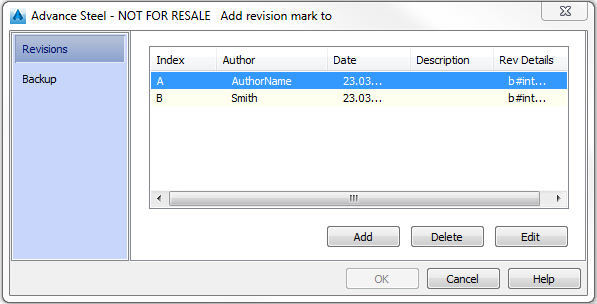
Three buttons allow managing the revisions list:
|
Button |
Description |
|
Add |
Adds a new revision in the revision list |
|
Delete |
Deletes the selected revision from the list |
|
Edit |
Allows modifying the revision information in the Revision mark dialog box |
Backup tab
This tab allows you to make a backup of the drawing before it is given a revision mark.
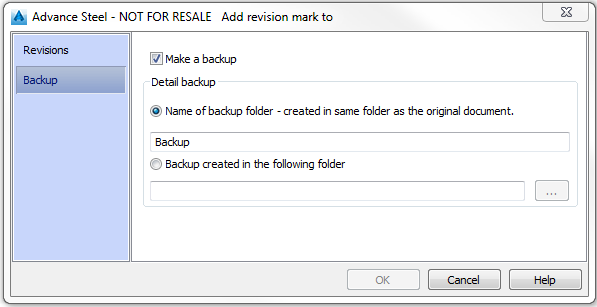
Make a backup
Creates a backup of the current drawing before adding the revision.
Detail backup
Select the backup folder.
Name of backup folder
Allows entering the name of the backup folder. The backup folder is created in the same folder as the original document.
Backup created in the following folder
Allows selecting the backup folder.
Revision mark dialog box
Allows you to enter information about the revision (revision data, author etc.). This information will appear in the revision table.