IFC - AISC MVD EM.11 format
You can access the new export from the existing Export IFC command, located on the ribbon, Export & Import tab, Exchange formats panel.
The dialog that appears when using the command is a new one for the IFC export and offers the option to choose between the old existing Advance Steel IFC export (which uses a Generic IFC2x3 schema) and the new IFC MVD EM.11 export introduced in this update release.
This is done from the Standard category. By default, the dialog has the Export IFC2x3 option checked and it remains as default even after a successful export with the Export IFC MVD.11 option.
The default path filled in the dialog is the same path as the one where the model is saved. The model needs to be saved first for the export to be successfully performed. The export path can be changed to any other location on the disk, by using the button on the right side of the path field.
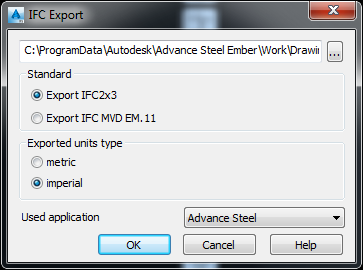
The dialog also offers the option to choose the units used during Export (metric or imperial).
The default value checked in the dialog is based on the length units in the Advance Steel model from which the export is done. Therefore, if the length units in the model are set on millimeters, then the metric box will be checked as default. For all other length unit settings (including inch or feet length unit settings) the imperial option will be set as default.
When exporting in metric, the units used to describe length values in the IFC will be millimeters. As for imperial, the units used inside the IFC will be decimal inch (e.g. 1 ½ "= 1.5).
The Used application field is NOT used by the IFC MVD export, as the new export doesn't use any type of mapping when outputting Advance Steel profiles.
Clicking OK will perform the export.
Once the export is finished, the program will output a report in the command line, containing the amount of objects written in the IFC file. The report will contain 1, 2, 3 or 4 lines (each line is demanded only if IFC exports at least one of the following object types: Beam, Plate, Bolt or Weld), and the sorting will always be the same.

The IFC MVD export can be performed on:
- The entire model. If no objects are selected when the Export IFC command is used, the export will be automatically performed on the entire model.
- Selected objects. You can preselect objects from the model using any method (individual selection or using Advance Steel queries / groups) and then use the Export IFC command.
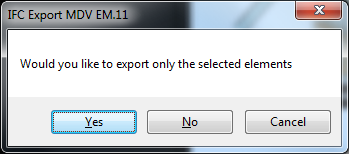
If a preselection is used, the Export IFC MVD command will display a message once using OK to initiate export, mentioning that the selection is done and giving the following options:
- Yes - only the selected objects are exported.
- No - the entire model is exported
- Cancel - cancels the export command