Values for many of the parameters listed in the Factory Properties browser can be selected and edited to change the properties of an asset. Assets can also be moved from one layer to another. Any changes made to a selected asset only reflect in that specific instance. Changes do not affect the Factory Assets library.
To access the browser, click Factory tab  Tools panel
  Factory Properties from the Palettes drop-down menu. You can also access the browser by right-clicking on an asset to display the context menu, and then selecting Factory > Factory Properties.
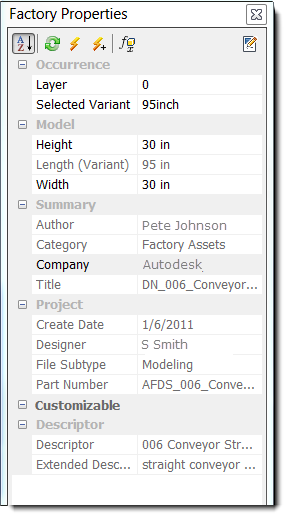
The Factory Properties browser becomes populated with asset data when a parameterized asset is selected in a factory layout assembly. Information is organized in the following categories. If a field is grayed-out, the value cannot change. If an asset is not defined for a category, the category does not display.
- Occurrence: The Layer section displays the layer name of the selected asset. If multiple assets are selected, the layer name appears as *MultiValues*. Click to the right of the layer name to display a drop-down list containing the names of all layers defined in the current layout. You can move the selected asset(s) to a different layer by selecting the desired layer from the drop-down list. If the selected asset is an asset variant, the Selected Variant option appears below the layer name in the Layer section. Click to the right of Selected Variant to display a drop-down list containing each of the parameters assigned to the asset variant. You can modify the asset by selecting a different variant parameter from the drop-down.
- Model: modeling parameters that have been specified as Key Parameters within an asset. Model parameters are defined using the Inventor Parameters command.
- Summary: properties defined in the Asset Properties Summary tab when the asset was created
- Project: properties defined in the Asset Properties Project tab when the asset was created
- Customizable: parameters represent specific iProperty and user-defined values entered when creating the asset using the Asset Properties command. These properties are organized based on categories defined when creating assets. To update a custom property, click
 in the upper right corner of the browser.
 - Descriptor: a description of the asset. Descriptors have general information about an asset such as the manufacturer, model name, and model number. Each copy of the asset has the same descriptor. An extended descriptor contains additional information about the asset; for example, "straight conveyor with variants" indicates that variations of this asset are available for selection when placing the asset.
- Tag: a tag associated with the asset. Asset Tags have specific information about a particular asset, such as the company inventory number, the asset serial number. Each copy of an asset can have its own asset tag.
For more information about modifying placed assets using the Factory Properties browser, see the Inventor Factory Help topic: Insert factory assets.