The Default T-Stance
In order for the HumanIK solvers to control a character, that character must be initialized in a basic T-stance that provides the HumanIK bio-mechanical model with crucial information about the geometry and proportions of your character’s skeleton.
Your character’s T-stance must match the description and example given below as closely as possible in order for the HumanIK inverse kinematics and retargeting solvers to produce accurate results for your character. Without a properly configured T-stance, the HumanIK solvers will base all of their operations on faulty data, and will likely produce skewed, awkward or unexpected poses.
The T-stance has the following requirements:
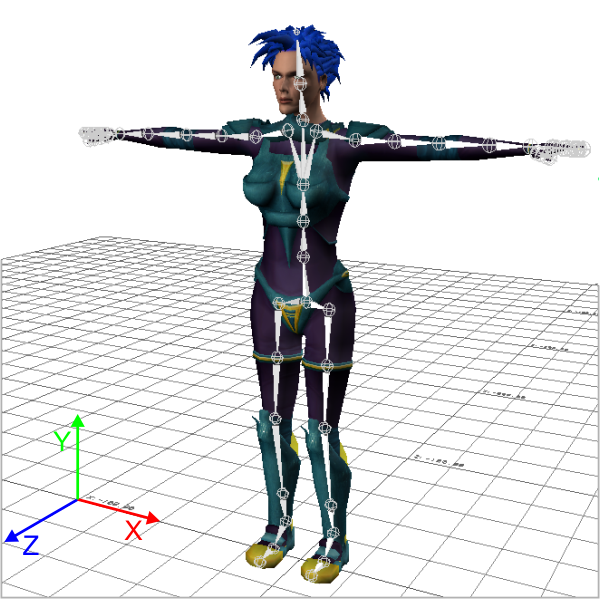
- The character must face along the positive direction of the Z axis.
- Its arms must be spread along the X axis. Its left arm should therefore be pointing along the positive direction of the X axis.
- The top of the character’s head must be up, i.e. in the positive direction of the Y axis.
- The character’s hands should be flat, palms facing the ground, with the thumbs parallel to the X axis.
- The character’s feet may be perpendicular to the legs (i.e. with the toes pointing along the Z axis as shown in the image below), or they may continue along the orientation of the legs (i.e. with the toes pointed straight down). The feet must not be rotated around the Y axis at all (i.e. the toes of the left foot should not point inward toward the right leg or outward away from the right leg, and vice-versa).
A typical T-stance is shown in the following image:
Quadrupeds
HumanIK can be used to control quadrupeds at runtime as well as bipeds. If you are creating a characterization for a quadruped character, you must set up the character’s skeleton in the same T-stance shown above. Although this biped T-stance is obviously awkward and untenable for a quadruped, you must set up your character in this biped stance in order to ensure that HumanIK is correctly set up with the geometry and proportions of your character’s skeleton.
Setting up the T-stance
Depending on the method you choose for characterizing your character, you provide HumanIK with this T-stance in different ways.
- If you create your character programmatically, your initialization code must set up each Node in your character with translation, rotation and scaling values that reflect the T-stance shown above. For details on this process, see Characterizing an HIKCharacter Programmatically.
- If you use the Characterization Tool to create your characterizations, the default
T-stance of the character is derived from the translation, rotation and scaling of
the bones you map to the HumanIK Nodes. Once you create an HIKCharacter from the contents of the characterization file exported by the Characterization Tool,
you cannot alter the T-stance.
See also Characterizing an HIKCharacter Visually. For more information on using the Characterization Tool, see its accompanying documentation.
Retrieving the T-stance
Each HIKCharacter keeps a record of its own default T-stance. You can retrieve this T-stance at any time by calling the HIKGetDefaultState() function.
 Except where otherwise noted, this work is licensed under a Creative Commons Attribution-NonCommercial-ShareAlike 3.0 Unported License. Please see the Autodesk Creative Commons FAQ for more information.