General Properties
The character properties listed on this page configure the general operation of the HumanIK inverse kinematics and retargeting solvers.
Pull engine
The following property configures the Pull engine used by the inverse kinematics and retargeting solvers.
HIKPullIterationCount
Determines the number of times the inverse kinematics solver calls its Pull engine to resolve the relative Pull values of your character’s Nodes and Effectors.
Higher values produce more precise results, but require more CPU resources.
Stiffness
The following properties allow you to control the stiffness of selected parts of your character’s skeleton.
HIKCtrlSpineStiffnessId
When HumanIK bends a character with many spine Nodes, each Node typically bends freely when contributing to the overall IK solution, making the character appear very flexible. This property allows you to shift rotation from additional spine bones to the base spine Node. This makes the spine appear stiffer.
Higher values shift rotation progressively toward the base spine Node; at a value of 1.0 only the base spine Node rotates, and additional spine Nodes remain fixed relative to the base spine Node. Lower values shift rotation more evenly across all spine Nodes; a value of 0.0 applies equal rotation to all spine Nodes.
HIKCtrlNeckStiffnessId
When the HumanIK Reach Rotation engine causes the head to rotate to a new orientation, this property controls whether that rotation is confined to the last (highest) Node in the character’s neck, or whether it is balanced across all Nodes in the neck.
Higher values shift rotation progressively toward the last (highest) neck Node; at a value of 1.0 only the last Node rotates, and additional neck Nodes remain fixed. Lower values shift rotation more evenly across all neck Nodes; a value of 0.0 applies equal rotation to all neck Nodes.
HIKCollarStiffnessX
Controls the flexibility of the character’s collar Nodes (the LeftCollarNodeId, RightCollarNodeId, LeftCollarExtraNodeId and RightCollarExtraNodeId Nodes) when rotating around the X axis.
Higher values cause the collar to be stiffer and less likely to rotate around the X axis; lower values cause the collar to be more flexible and more likely to rotate around the X axis.
HIKCollarStiffnessY
Controls the flexibility of the character’s collar Nodes (the LeftCollarNodeId, RightCollarNodeId, LeftCollarExtraNodeId and RightCollarExtraNodeId Nodes) when rotating around the Y axis.
Higher values cause the collar to be stiffer and less likely to rotate around the Y axis; lower values cause the collar to be more flexible and more likely to rotate around the Y axis.
HIKCollarStiffnessZ
Controls the flexibility of the character’s collar Nodes (the LeftCollarNodeId, RightCollarNodeId, LeftCollarExtraNodeId and RightCollarExtraNodeId Nodes) when rotating around the Z axis.
Higher values cause the collar to be stiffer and less likely to rotate around the Z axis; lower values cause the collar to be more flexible and more likely to rotate around the Z axis.
Knees and elbows
The following properties control the way your character’s knees and elbows bend and rotate.
HIKLeftArmMaxExtensionAngle
Determines the maximum angle of extension for the left arm along its yaw axis.
The default value of 180.0 allows the arm to straighten completely, but not to bend backward. Lower values prevent the arm from straightening completely.
HIKCtrlResistMaximumExtensionLeftElbow
Applies a stiffness factor that progressively dampens the extension of the left elbow as it approaches its maximum extension angle, preventing the limb from snapping.
Higher values make the left elbow extend more gradually; lower values make the limb extend more rapidly. The default value of 50.0 corrects most limb snapping, and should be appropriate in most cases.
HIKCtrlResistCompressionFactorLeftElbow
Applies a stiffness factor that dampens the compression or bending inward of the left elbow.
Higher values cause the left elbow to resist being bent. Setting the maximum value forces the elbow to keep its original FK angle, which may cause the character’s chest to move instead.
Lower values allow the left elbow to bend inward more freely. Setting the minimum value allows completely free movement.
HIKLeftElbowKillPitchId
Determines whether or not the inverse kinematics solver forbids rotations of the left elbow around its pitch axis, preventing it from bending sideways in an unrealistic manner.
When this property is de-activated, the inverse kinematics solver normally discourages pitch rotations on the elbow in the poses it generates for your characters. However, pitch rotations may be allowed in certain cases—for example, if you directly assign a Reach Rotation and a pitch rotation to the left elbow Effector.
When this property is activated, all pitch rotations above 15 degrees are forbidden, even if you attempt to assign a pitch rotation to the Effector directly. Instead, in this case, the shoulder will rotate up to 90 degrees in order to make the forearm point in the requested orientation.
HIKRightArmMaxExtensionAngle
Determines the maximum angle of extension for the right arm along its yaw axis.
The default value of 180.0 allows the arm to straighten completely, but not to bend backward. Lower values prevent the arm from straightening completely.
HIKCtrlResistMaximumExtensionRightElbow
Applies a stiffness factor that progressively dampens the extension of the right elbow as it approaches its maximum extension angle, preventing the limb from snapping.
Higher values make the right elbow extend more gradually; lower values make the limb extend more rapidly. The default value of 50.0 corrects most limb snapping, and should be appropriate in most cases.
HIKCtrlResistCompressionFactorRightElbow
Applies a stiffness factor that dampens the compression or bending inward of the right elbow.
Higher values cause the right elbow to resist being bent. Setting the maximum value forces the elbow to keep its original FK angle, which may cause the character’s chest to move instead.
Lower values allow the right elbow to bend inward more freely. Setting the minimum value allows completely free movement.
HIKRightElbowKillPitchId
Determines whether or not the inverse kinematics solver forbids rotations of the right elbow around its pitch axis, preventing it from bending sideways in an unrealistic manner.
When this property is de-activated, the inverse kinematics solver normally discourages pitch rotations on the elbow in the poses it generates for your characters. However, pitch rotations may be allowed in certain cases—for example, if you directly assign a Reach Rotation and a pitch rotation to the right elbow Effector.
When this property is activated, all pitch rotations above 15 degrees are forbidden, even if you attempt to assign a pitch rotation to the Effector directly. Instead, in this case, the shoulder will rotate up to 90 degrees in order to make the forearm point in the requested orientation.
HIKLeftLegMaxExtensionAngle
Determines the maximum angle of extension for the left leg along its yaw axis.
The default value of 180.0 allows the leg to straighten completely, but not to bend backward. Lower values prevent the leg from straightening completely.
HIKCtrlResistMaximumExtensionLeftKnee
Applies a stiffness factor that progressively dampens the extension of the left knee as it approaches its maximum extension angle, preventing the limb from snapping.
Higher values make the left knee extend more gradually; lower values make the limb extend more rapidly. The default value of 50.0 corrects most limb snapping, and should be appropriate in most cases.
HIKCtrlResistCompressionFactorLeftKnee
Applies a stiffness factor that dampens the compression or bending inward of the left knee.
Higher values cause the left knee to resist being bent. Setting the maximum value forces the knee to keep its original FK angle, which may cause the character’s chest to move instead.
Lower values allow the left knee to bend inward more freely. Setting the minimum value allows completely free movement.
HIKLeftKneeKillPitchId
Determines whether or not the inverse kinematics solver forbids rotations of the left knee around its pitch axis, preventing it from bending sideways in an unrealistic manner.
When this property is de-activated, the inverse kinematics solver normally discourages pitch rotations on the knee in the poses it generates for your characters. However, pitch rotations may be allowed in certain cases—for example, if you directly assign a Reach Rotation and a pitch rotation to the left knee Effector.
When this property is activated, all pitch rotations above 15 degrees are forbidden, even if you attempt to assign a pitch rotation to the Effector directly. Instead, in this case, the hip will rotate up to 90 degrees in order to make the lower leg point in the requested orientation.
HIKRightLegMaxExtensionAngle
Determines the maximum angle of extension for the right leg along its yaw axis.
The default value of 180.0 allows the leg to straighten completely, but not to bend backward. Lower values prevent the leg from straightening completely.
HIKCtrlResistMaximumExtensionRightKnee
Applies a stiffness factor that progressively dampens the extension of the right knee as it approaches its maximum extension angle, preventing the limb from snapping.
Higher values make the right knee extend more gradually; lower values make the limb extend more rapidly. The default value of 50.0 corrects most limb snapping, and should be appropriate in most cases.
HIKCtrlResistCompressionFactorRightKnee
Applies a stiffness factor that dampens the compression or bending inward of the right knee.
Higher values cause the right knee to resist being bent. Setting the maximum value forces the knee to keep its original FK angle, which may cause the character’s chest to move instead.
Lower values allow the right knee to bend inward more freely. Setting the minimum value allows completely free movement.
HIKRightKneeKillPitchId
Determines whether or not the inverse kinematics solver forbids rotations of the right knee around its pitch axis, preventing it from bending sideways in an unrealistic manner.
When this property is de-activated, the inverse kinematics solver normally discourages pitch rotations on the knee in the poses it generates for your characters. However, pitch rotations may be allowed in certain cases—for example, if you directly assign a Reach Rotation and a pitch rotation to the right knee Effector.
When this property is activated, all pitch rotations above 15 degrees are forbidden, even if you attempt to assign a pitch rotation to the Effector directly. Instead, in this case, the hip will rotate up to 90 degrees in order to make the lower leg point in the requested orientation.
HIKRealisticLeftKneeSolvingId
When the left ankle rotates, this parameter determines the extent to which the left hip rotates in order to make the left knee follow the orientation of the foot.
With the default value of 0.0, the ankle rotates completely independently of the knee. The foot can point in any direction without constraining the position or rotation of the knee, which can create unrealistic positions. For example, the left foot might point 90 degrees inward toward the right foot while the left knee continues to point straight ahead.
Increasing the value of this parameter applies a percentage of the ankle’s rotation back to the hip, keeping the knee more in line with the orientation of the foot. Setting the value of this parameter to its maximum value causes the knee to stay completely in line with the orientation of the foot as the ankle rotates.
HIKRealisticRightKneeSolvingId
When the right ankle rotates, this parameter determines the extent to which the right hip rotates in order to make the right knee follow the orientation of the foot.
With the default value of 0.0, the ankle rotates completely independently of the knee. The foot can point in any direction without constraining the position or rotation of the knee, which can create unrealistic positions. For example, the right foot might point 90 degrees inward toward the left foot while the right knee continues to point straight ahead.
Increasing the value of this parameter applies a percentage of the ankle’s rotation back to the hip, keeping the knee more in line with the orientation of the foot. Setting the value of this parameter to its maximum value causes the knee to stay completely in line with the orientation of the foot as the ankle rotates.
Roll extraction and propagation
The following properties control the way HumanIK deals with the roll rotations that it applies to your character’s arms and legs—their rotation around the axis parallel to their associated bone. For details, see Character Properties.
HIKRollExtractionMode
Determines the method used by the HumanIK inverse kinematics solver to apply roll rotations from a Node to its associated Roll Node—for example, from the LeftElbowNodeId Node to the LeftElbowRollNodeId Node.
HIKLeftUpLegRollId
Determines whether or not rotations of the LeftHipNodeId around its roll axis are extracted and applied to the next Node down the joint chain. The rotation is applied to the LeftHipRollNodeId if characterized, or to the LeftKneeNodeId if not.
When this property is on, its value determines what percentage of the original roll rotation is extracted from the original Node and applied instead to its child Node.
At 1.0, all of the roll is transferred from the original Node to its child.
At 0.5, the roll is equally distributed between the original Node and its child.
At 0.0, none of the roll is transferred to the child, moving only the original Node.
| mode type: |
|
| accepted modes: |
0: All roll rotation on the LeftHipNodeId is always applied to that Node, and not to its child. 1: A percentage of the roll rotation applied to the LeftHipNodeId is extracted and applied instead to its child Node. The percentage is set by the value of this property. |
| default mode: |
0 |
| unit type: |
percentage |
| accepted values: |
Between 0.0 and 1.0 |
| default value: |
0.6 |
HIKLeftUpLegRollExId
Determines whether or not rotations of the LeftHipRollNodeId around its roll axis are extracted and applied to its child Node: LeftKneeNodeId. The value of this property determines the percentage of the original roll rotation to be extracted from the roll Node and applied instead to its child Node.
At 0.0, none of the roll is transferred to the child, moving only the roll Node.
At 0.5, the roll is equally distributed between the roll Node and its child.
At 1.0, all of the roll is transferred from the roll Node to its child.
Values larger than1.0 "over-extract" the rotation: they extract more rotation from the roll Node than was initially applied to it from the parent Node. This effectively causes the roll Node to rotate in the opposite direction to its parent Node. All rotation extracted from the roll Node is then applied to the child Node in the original direction of rotation of the parent Node. For example, suppose that you have a roll Node with 90 degrees of roll rotation applied to it (extracted from its parent), and you set this value to 1.5 for that roll Node. The roll Node is rotated back by 135 degrees (1.5 * 90), which results in an apparent rotation of 45 degrees in the opposite direction. The child of the roll Node is then rotated by 135 degrees relative to the new rotation of the roll Node, causing it to exhibit the original rotation of the roll Node.
HIKLeftLegRollId
Determines whether or not rotations of the LeftKneeNodeId around its roll axis are extracted and applied to the next Node down the joint chain. The rotation is applied to the LeftKneeRollNodeId if characterized, or to the LeftAnkleNodeId if not.
When this property is on, its value determines what percentage of the original roll rotation is extracted from the original Node and applied instead to its child Node.
At 1.0, all of the roll is transferred from the original Node to its child.
At 0.5, the roll is equally distributed between the original Node and its child.
At 0.0, none of the roll is transferred to the child, moving only the original Node.
| mode type: |
|
| accepted modes: |
0: All roll rotation on the LeftKneeNodeId is always applied to that Node, and not to its child. 1: A percentage of the roll rotation applied to the LeftKneeNodeId is extracted and applied instead to its child Node. The percentage is set by the value of this property. |
| default mode: |
0 |
| unit type: |
percentage |
| accepted values: |
Between 0.0 and 1.0 |
| default value: |
0.6 |
HIKLeftKneeRollExId
Determines whether or not rotations of the LeftKneeRollNodeId around its roll axis are extracted and applied to its child Node: LeftAnkleNodeId. The value of this property determines the percentage of the original roll rotation to be extracted from the roll Node and applied instead to its child Node.
At 0.0, none of the roll is transferred to the child, moving only the roll Node.
At 0.5, the roll is equally distributed between the roll Node and its child.
At 1.0, all of the roll is transferred from the roll Node to its child.
Values larger than1.0 "over-extract" the rotation: they extract more rotation from the roll Node than was initially applied to it from the parent Node. This effectively causes the roll Node to rotate in the opposite direction to its parent Node. All rotation extracted from the roll Node is then applied to the child Node in the original direction of rotation of the parent Node. For example, suppose that you have a roll Node with 90 degrees of roll rotation applied to it (extracted from its parent), and you set this value to 1.5 for that roll Node. The roll Node is rotated back by 135 degrees (1.5 * 90), which results in an apparent rotation of 45 degrees in the opposite direction. The child of the roll Node is then rotated by 135 degrees relative to the new rotation of the roll Node, causing it to exhibit the original rotation of the roll Node.
HIKRightUpLegRollId
Determines whether or not rotations of the RightHipNodeId around its roll axis are extracted and applied to the next Node down the joint chain. The rotation is applied to the RightHipRollNodeId if characterized, or to the RightKneeNodeId if not.
When this property is on, its value determines what percentage of the original roll rotation is extracted from the original Node and applied instead to its child Node.
At 1.0, all of the roll is transferred from the original Node to its child.
At 0.5, the roll is equally distributed between the original Node and its child.
At 0.0, none of the roll is transferred to the child, moving only the original Node.
| mode type: |
|
| accepted modes: |
0: All roll rotation on the RightHipNodeId is always applied to that Node, and not to its child. 1: A percentage of the roll rotation applied to the RightHipNodeId is extracted and applied instead to its child Node. The percentage is set by the value of this property. |
| default mode: |
0 |
| unit type: |
percentage |
| accepted values: |
Between 0.0 and 1.0 |
| default value: |
0.6 |
HIKRightHipRollExId
Determines whether or not rotations of the RightHipRollNodeId around its roll axis are extracted and applied to its child Node: RightKneeNodeId. The value of this property determines the percentage of the original roll rotation to be extracted from the roll Node and applied instead to its child Node.
At 0.0, none of the roll is transferred to the child, moving only the roll Node.
At 0.5, the roll is equally distributed between the roll Node and its child.
At 1.0, all of the roll is transferred from the roll Node to its child.
Values larger than1.0 "over-extract" the rotation: they extract more rotation from the roll Node than was initially applied to it from the parent Node. This effectively causes the roll Node to rotate in the opposite direction to its parent Node. All rotation extracted from the roll Node is then applied to the child Node in the original direction of rotation of the parent Node. For example, suppose that you have a roll Node with 90 degrees of roll rotation applied to it (extracted from its parent), and you set this value to 1.5 for that roll Node. The roll Node is rotated back by 135 degrees (1.5 * 90), which results in an apparent rotation of 45 degrees in the opposite direction. The child of the roll Node is then rotated by 135 degrees relative to the new rotation of the roll Node, causing it to exhibit the original rotation of the roll Node.
HIKRightLegRollId
Determines whether or not rotations of the RightKneeNodeId around its roll axis are extracted and applied to the next Node down the joint chain. The rotation is applied to the RightKneeRollNodeId if characterized, or to the RightAnkleNodeId if not.
When this property is on, its value determines what percentage of the original roll rotation is extracted from the original Node and applied instead to its child Node.
At 1.0, all of the roll is transferred from the original Node to its child.
At 0.5, the roll is equally distributed between the original Node and its child.
At 0.0, none of the roll is transferred to the child, moving only the original Node.
| mode type: |
|
| accepted modes: |
0: All roll rotation on the RightKneeNodeId is always applied to that Node, and not to its child. 1: A percentage of the roll rotation applied to the RightKneeNodeId is extracted and applied instead to its child Node. The percentage is set by the value of this property. |
| default mode: |
0 |
| unit type: |
percentage |
| accepted values: |
Between 0.0 and 1.0 |
| default value: |
0.6 |
HIKRightKneeRollExId
Determines whether or not rotations of the RightKneeRollNodeId around its roll axis are extracted and applied to its child Node: RightAnkleNodeId. The value of this property determines the percentage of the original roll rotation to be extracted from the roll Node and applied instead to its child Node.
At 0.0, none of the roll is transferred to the child, moving only the roll Node.
At 0.5, the roll is equally distributed between the roll Node and its child.
At 1.0, all of the roll is transferred from the roll Node to its child.
Values larger than1.0 "over-extract" the rotation: they extract more rotation from the roll Node than was initially applied to it from the parent Node. This effectively causes the roll Node to rotate in the opposite direction to its parent Node. All rotation extracted from the roll Node is then applied to the child Node in the original direction of rotation of the parent Node. For example, suppose that you have a roll Node with 90 degrees of roll rotation applied to it (extracted from its parent), and you set this value to 1.5 for that roll Node. The roll Node is rotated back by 135 degrees (1.5 * 90), which results in an apparent rotation of 45 degrees in the opposite direction. The child of the roll Node is then rotated by 135 degrees relative to the new rotation of the roll Node, causing it to exhibit the original rotation of the roll Node.
HIKLeftArmRollId
Determines whether or not rotations of the LeftShoulderNodeId around its roll axis are extracted and applied to the next Node down the joint chain. The rotation is applied to the LeftShoulderRollNodeId if characterized, or to the LeftElbowNodeId if not.
When this property is on, its value determines what percentage of the original roll rotation is extracted from the original Node and applied instead to its child Node.
At 1.0, all of the roll is transferred from the original Node to its child.
At 0.5, the roll is equally distributed between the original Node and its child.
At 0.0, none of the roll is transferred to the child, moving only the original Node.
| mode type: |
|
| accepted modes: |
0: All roll rotation on the LeftShoulderNodeId is always applied to that Node, and not to its child. 1: A percentage of the roll rotation applied to the LeftShoulderNodeId is extracted and applied instead to its child Node. The percentage is set by the value of this property. |
| default mode: |
0 |
| unit type: |
percentage |
| accepted values: |
Between 0.0 and 1.0 |
| default value: |
0.6 |
HIKLeftShoulderRollExId
Determines whether or not rotations of the LeftShoulderRollNodeId around its roll axis are extracted and applied to its child Node: LeftElbowNodeId. The value of this property determines the percentage of the original roll rotation to be extracted from the roll Node and applied instead to its child Node.
At 0.0, none of the roll is transferred to the child, moving only the roll Node.
At 0.5, the roll is equally distributed between the roll Node and its child.
At 1.0, all of the roll is transferred from the roll Node to its child.
Values larger than1.0 "over-extract" the rotation: they extract more rotation from the roll Node than was initially applied to it from the parent Node. This effectively causes the roll Node to rotate in the opposite direction to its parent Node. All rotation extracted from the roll Node is then applied to the child Node in the original direction of rotation of the parent Node. For example, suppose that you have a roll Node with 90 degrees of roll rotation applied to it (extracted from its parent), and you set this value to 1.5 for that roll Node. The roll Node is rotated back by 135 degrees (1.5 * 90), which results in an apparent rotation of 45 degrees in the opposite direction. The child of the roll Node is then rotated by 135 degrees relative to the new rotation of the roll Node, causing it to exhibit the original rotation of the roll Node.
HIKLeftForeArmRollId
Determines whether or not rotations of the LeftElbowNodeId around its roll axis are extracted and applied to the next Node down the joint chain. The rotation is applied to the LeftElbowRollNodeId if characterized, or to the LeftWristNodeId if not.
When this property is on, its value determines what percentage of the original roll rotation is extracted from the original Node and applied instead to its child Node.
At 1.0, all of the roll is transferred from the original Node to its child.
At 0.5, the roll is equally distributed between the original Node and its child.
At 0.0, none of the roll is transferred to the child, moving only the original Node.
| mode type: |
|
| accepted modes: |
0: All roll rotation on the LeftElbowNodeId is always applied to that Node, and not to its child. 1: A percentage of the roll rotation applied to the LeftElbowNodeId is extracted and applied instead to its child Node. The percentage is set by the value of this property. |
| default mode: |
0 |
| unit type: |
percentage |
| accepted values: |
Between 0.0 and 1.0 |
| default value: |
0.6 |
HIKLeftElbowRollExId
Determines whether or not rotations of the LeftElbowRollNodeId around its roll axis are extracted and applied to its child Node: LeftWristNodeId. The value of this property determines the percentage of the original roll rotation to be extracted from the roll Node and applied instead to its child Node.
At 0.0, none of the roll is transferred to the child, moving only the roll Node.
At 0.5, the roll is equally distributed between the roll Node and its child.
At 1.0, all of the roll is transferred from the roll Node to its child.
Values larger than1.0 "over-extract" the rotation: they extract more rotation from the roll Node than was initially applied to it from the parent Node. This effectively causes the roll Node to rotate in the opposite direction to its parent Node. All rotation extracted from the roll Node is then applied to the child Node in the original direction of rotation of the parent Node. For example, suppose that you have a roll Node with 90 degrees of roll rotation applied to it (extracted from its parent), and you set this value to 1.5 for that roll Node. The roll Node is rotated back by 135 degrees (1.5 * 90), which results in an apparent rotation of 45 degrees in the opposite direction. The child of the roll Node is then rotated by 135 degrees relative to the new rotation of the roll Node, causing it to exhibit the original rotation of the roll Node.
HIKRightArmRollId
Determines whether or not rotations of the RightShoulderNodeId around its roll axis are extracted and applied to the next Node down the joint chain. The rotation is applied to the RightShoulderRollNodeId if characterized, or to the RightElbowNodeId if not.
When this property is on, its value determines what percentage of the original roll rotation is extracted from the original Node and applied instead to its child Node.
At 1.0, all of the roll is transferred from the original Node to its child.
At 0.5, the roll is equally distributed between the original Node and its child.
At 0.0, none of the roll is transferred to the child, moving only the original Node.
| mode type: |
|
| accepted modes: |
0: All roll rotation on the RightShoulderNodeId is always applied to that Node, and not to its child. 1: A percentage of the roll rotation applied to the RightShoulderNodeId is extracted and applied instead to its child Node. The percentage is set by the value of this property. |
| default mode: |
0 |
| unit type: |
percentage |
| accepted values: |
Between 0.0 and 1.0 |
| default value: |
0.6 |
HIKRightShoulderRollExId
Determines whether or not rotations of the RightShoulderRollNodeId around its roll axis are extracted and applied to its child Node: RightElbowNodeId. The value of this property determines the percentage of the original roll rotation to be extracted from the roll Node and applied instead to its child Node.
At 0.0, none of the roll is transferred to the child, moving only the roll Node.
At 0.5, the roll is equally distributed between the roll Node and its child.
At 1.0, all of the roll is transferred from the roll Node to its child.
Values larger than1.0 "over-extract" the rotation: they extract more rotation from the roll Node than was initially applied to it from the parent Node. This effectively causes the roll Node to rotate in the opposite direction to its parent Node. All rotation extracted from the roll Node is then applied to the child Node in the original direction of rotation of the parent Node. For example, suppose that you have a roll Node with 90 degrees of roll rotation applied to it (extracted from its parent), and you set this value to 1.5 for that roll Node. The roll Node is rotated back by 135 degrees (1.5 * 90), which results in an apparent rotation of 45 degrees in the opposite direction. The child of the roll Node is then rotated by 135 degrees relative to the new rotation of the roll Node, causing it to exhibit the original rotation of the roll Node.
HIKRightForeArmRollId
Determines whether or not rotations of the RightElbowNodeId around its roll axis are extracted and applied to the next Node down the joint chain. The rotation is applied to the RightElbowRollNodeId if characterized, or to the RightWristNodeId if not.
When this property is on, its value determines what percentage of the original roll rotation is extracted from the original Node and applied instead to its child Node.
At 1.0, all of the roll is transferred from the original Node to its child.
At 0.5, the roll is equally distributed between the original Node and its child.
At 0.0, none of the roll is transferred to the child, moving only the original Node.
| mode type: |
|
| accepted modes: |
0: All roll rotation on the RightElbowNodeId is always applied to that Node, and not to its child. 1: A percentage of the roll rotation applied to the RightElbowNodeId is extracted and applied instead to its child Node. The percentage is set by the value of this property. |
| default mode: |
0 |
| unit type: |
percentage |
| accepted values: |
Between 0.0 and 1.0 |
| default value: |
0.6 |
HIKRightElbowRollExId
Determines whether or not rotations of the RightElbowRollNodeId around its roll axis are extracted and applied to its child Node: RightWristNodeId. The value of this property determines the percentage of the original roll rotation to be extracted from the roll Node and applied instead to its child Node.
At 0.0, none of the roll is transferred to the child, moving only the roll Node.
At 0.5, the roll is equally distributed between the roll Node and its child.
At 1.0, all of the roll is transferred from the roll Node to its child.
Values larger than1.0 "over-extract" the rotation: they extract more rotation from the roll Node than was initially applied to it from the parent Node. This effectively causes the roll Node to rotate in the opposite direction to its parent Node. All rotation extracted from the roll Node is then applied to the child Node in the original direction of rotation of the parent Node. For example, suppose that you have a roll Node with 90 degrees of roll rotation applied to it (extracted from its parent), and you set this value to 1.5 for that roll Node. The roll Node is rotated back by 135 degrees (1.5 * 90), which results in an apparent rotation of 45 degrees in the opposite direction. The child of the roll Node is then rotated by 135 degrees relative to the new rotation of the roll Node, causing it to exhibit the original rotation of the roll Node.
Squash ’n’ Stretch
The following properties control the way the Squash ’n’ Stretch solver compresses and extends your character’s limbs. See also Using Squash 'n' Stretch.
HIKStretchStartArmsAndLegs
HIKStretchStopArmsAndLegs
Sets the percentage of the arm or leg length at which those limbs will stop stretching freely. This is a soft limit; above this threshold, the limb will continue to stretch at a reduced rate in order to avoid popping.
HIKSnSReachLeftWrist
Sets the contribution of the Squash ’n’ Stretch engine when solving the left arm, relative to alternate ways of making the left wrist reach its target position (such as using the Pull engine, or changing the angle of the elbow).
A value of 0.0 effectively disables Squash ’n’ Stretch for the limb.
A value of 1.0 uses Squash ’n’ Stretch as much as possible. However, note that the alternate ways of making the left wrist reach its target position will still contribute to the final solution somewhat.
HIKSnSReachRightWrist
Sets the contribution of the Squash ’n’ Stretch engine when solving the right arm, relative to alternate ways of making the right wrist reach its target position (such as using the Pull engine, or changing the angle of the elbow).
A value of 0.0 effectively disables Squash ’n’ Stretch for the limb.
A value of 1.0 uses Squash ’n’ Stretch as much as possible. However, note that the alternate ways of making the right wrist reach its target position will still contribute to the final solution somewhat.
HIKSnSReachLeftAnkle
Sets the contribution of the Squash ’n’ Stretch engine when solving the left leg, relative to alternate ways of making the left ankle reach its target position (such as using the Pull engine, or changing the angle of the knee).
A value of 0.0 effectively disables Squash ’n’ Stretch for the limb.
A value of 1.0 uses Squash ’n’ Stretch as much as possible. However, note that the alternate ways of making the left ankle reach its target position will still contribute to the final solution somewhat.
HIKSnSReachRightAnkle
Sets the contribution of the Squash ’n’ Stretch engine when solving the right leg, relative to alternate ways of making the right ankle reach its target position (such as using the Pull engine, or changing the angle of the knee).
A value of 0.0 effectively disables Squash ’n’ Stretch for the limb.
A value of 1.0 uses Squash ’n’ Stretch as much as possible. However, note that the alternate ways of making the right ankle reach its target position will still contribute to the final solution somewhat.
HIKSnSScaleArmsAndLegs
Determines whether the compression and expansion of the arms and legs is achieved through changing the translations of the Nodes, changing the scale of the Nodes, or a blend of the two.
A value of 0.0 keeps the scale of the Nodes in the arms and legs the same at all times. Squash ’n’ Stretch is achieved by changing the translations and rotations of the Nodes.
A value of 1.0 keeps the translations and rotations of the Nodes in the arms and legs the same in local space. Squash ’n’ Stretch is achieved by changing the scaling of the Nodes.
A value between 0.0 and 1.0 interpolates the scaling of the Nodes between these extremes.
HIKSnSReachChestEnd
Sets the contribution of the Squash ’n’ Stretch engine when solving the spine, relative to alternate ways of making the ChestEndEffectorId reach its target position (such as using the Pull engine, or changing the angle of the Nodes in the spine).
A value of 0.0 effectively disables Squash ’n’ Stretch for the limb.
A value of 1.0 uses Squash ’n’ Stretch as much as possible. However, note that the alternate ways of making the chest reach its target position will still contribute to the final solution somewhat.
HIKSnSScaleSpineChildren
Determines how much of the compression and expansion that is applied to the spine is applied also to the child Nodes of the spine:
LeftCollarNodeId if characterized, or LeftShoulderNodeId if not
RightCollarNodeId if characterized, or RightShoulderNodeId if not
Note that the scale of these Nodes is never changed, even when the HIKSnSScaleSpine property is set to a positive value. The compression and expansion of the spine children is always achieved through translating the Nodes rather than scaling them.
HIKSnSScaleSpine
Determines whether the compression and expansion of the spine is achieved through changing the translations of the Nodes, changing the scale of the Nodes, or a blend of the two.
A value of 0.0 keeps the scale of the Nodes in the spine the same at all times. Squash ’n’ Stretch is achieved by changing the translations and rotations of the Nodes.
A value of 1.0 keeps the translations and rotations of the Nodes in the spine the same in local space. Squash ’n’ Stretch is achieved by changing the scaling of the Nodes.
A value between 0.0 and 1.0 interpolates the scaling of the Nodes between these extremes.
HIKSnSReachHead
Sets the contribution of the Squash ’n’ Stretch engine when solving the neck, relative to alternate ways of making the HeadEffectorId reach its target position (such as using the Pull engine, or changing the angle of the Nodes in the neck).
A value of 0.0 effectively disables Squash ’n’ Stretch for the limb.
A value of 1.0 uses Squash ’n’ Stretch as much as possible. However, note that the alternate ways of making the head reach its target position will still contribute to the final solution somewhat.
HIKSnSScaleNeck
Determines whether the compression and expansion of the neck is achieved through changing the translations of the Nodes, changing the scale of the Nodes, or a blend of the two.
A value of 0.0 keeps the scale of the Nodes in the neck the same at all times. Squash ’n’ Stretch is achieved by changing the translations and rotations of the Nodes.
A value of 1.0 keeps the translations and rotations of the Nodes in the neck the same in local space. Squash ’n’ Stretch is achieved by changing the scaling of the Nodes.
A value between 0.0 and 1.0 interpolates the scaling of the Nodes between these extremes.
HIKSnSSmoothReach
This property is used in conjunction with the HIKSnSReachChestEnd and HIKSnSReachHead properties. It indicates whether or not the reach should be smoothed.
Shoulder control
The following properties control the way HumanIK moves your character’s shoulders.
HIKRealisticShoulder
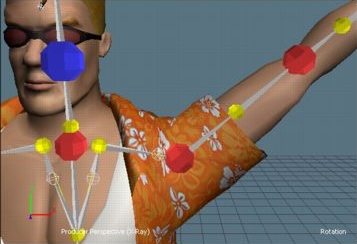
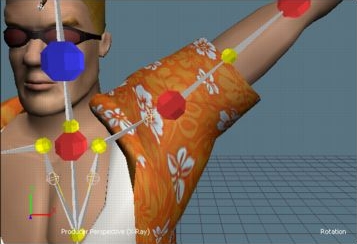
Determines the percentage of the rotation applied to the shoulders (the LeftShoulderNodeId and RightShoulderNodeId Nodes) that is extracted from the shoulder and applied instead to the collar bones (the LeftCollarNodeId and RightCollarNodeId Nodes), to simulate the behavior of human shoulders when the arms are raised.
|
For example, in the image on the left, the character raises its left arm without the HIKRealisticShoulder property activated. The resulting pose creates an unlikely configuration of the shoulder. |
|
In this image, the HIKRealisticShoulder property is activated, and its value is set to 1.0. When the arm rotates, 100% of the rotation is transferred back to the collar bone, causing the model’s shoulder to move upwards. |
HIKExtraCollarRatioId
When the character has extra collar bones in its skeleton (defined by the LeftCollarExtraNodeId and RightCollarExtraNodeId Nodes respectively), this property controls how HumanIK spreads rotations and translations across those collar Nodes.
Lower values cause movements to be shifted towards the base collar bones (the LeftCollarNodeId and RightCollarNodeId Nodes); higher values cause movements to be shifted progressively towards the extra collar bones.
Hip control
The following properties control the way HumanIK moves your character’s hips.
HIKHipsTranslationModeId
If your character has a special Node designated for maintaining the translation of its hips (the HipsTranslationId Node), this property determines whether or not rotations applied to your character’s hips (the LeftHipNodeId and RightHipNodeId Nodes) are also applied to the special translation Node.
HIKCtrlEnforceGravityId
Determines the extent to which the HumanIK inverse kinematics solver attempts to keep the character’s center of gravity, its hips, balanced between the character’s feet.
Higher values constrain the movement of the hips, keeping them in between the positions of the character’s feet. Lower values allow the hips to move freely to any location, regardless of the location of the feet; this may place the character in a pose that would cause a real human to overbalance due to the force of gravity.
This property is used only when the Resist value for the translation of the hips, set by the HIKCtrlResistHipsPositionId property, is greater than zero.
HIKLockXId
HIKLockYId
Hip and Chest Effector offsets
The following properties control the offsets applied to your character’s hip and chest Effectors. See also Mapping Joints to HumanIK Nodes and Effectors.
HIKHipsTOffsetXId
By default, the HipsEffectorId controls an imaginary point on the skeleton located half-way between the positions of the LeftHipNodeId and RightHipNodeId when your character stands in its default T-stance. This parameter applies an offset to this imaginary point along the X axis.
HIKHipsTOffsetYId
By default, the HipsEffectorId controls an imaginary point on the skeleton located half-way between the positions of the LeftHipNodeId and RightHipNodeId when your character stands in its default T-stance. This parameter applies an offset to this imaginary point along the Y axis.
HIKHipsTOffsetZId
By default, the HipsEffectorId controls an imaginary point on the skeleton located half-way between the positions of the LeftHipNodeId and RightHipNodeId when your character stands in its default T-stance. This parameter applies an offset to this imaginary point along the Z axis.
HIKChestTOffsetXId
By default, the ChestEndEffectorId controls an imaginary point on the skeleton located half-way between the positions of the LeftShoulderNodeId and RightShoulderNodeId when your character stands in its default T-stance. This parameter applies an offset to this imaginary point along the X axis.
When retargeting, this offset is used only when the HIKReachActorChestId property is set to a non-zero value for the target character.
HIKChestTOffsetYId
By default, the ChestEndEffectorId controls an imaginary point on the skeleton located half-way between the positions of the LeftShoulderNodeId and RightShoulderNodeId when your character stands in its default T-stance. This parameter applies an offset to this imaginary point along the Y axis.
When retargeting, this offset is used only when the HIKReachActorChestId property is set to a non-zero value for the target character.
HIKChestTOffsetZId
By default, the ChestEndEffectorId controls an imaginary point on the skeleton located half-way between the positions of the LeftShoulderNodeId and RightShoulderNodeId when your character stands in its default T-stance. This parameter applies an offset to this imaginary point along the Z axis.
When retargeting, this offset is used only when the HIKReachActorChestId property is set to a non-zero value for the target character. It affects the mass center of the shoulders, and allows for a more realistic retargeting when the shoulders of the source and destination characters do not match.
 Except where otherwise noted, this work is licensed under a Creative Commons Attribution-NonCommercial-ShareAlike 3.0 Unported License. Please see the Autodesk Creative Commons FAQ for more information.