Pull
Pull allows a joint to move the other joint chains in the character’s skeleton in order to reach its target position.
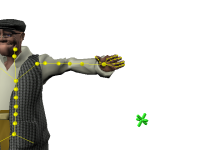
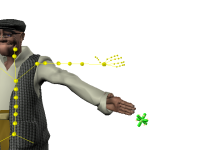
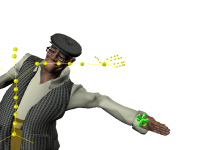
It is important to note that Pull only applies when the Reach Translation applied to a Node is non-zero. If the Reach Translation value for an Effector is zero, the Pull value for that Effector is not taken into account.
Pull priorities
The inverse kinematics solver attempts to satisfy the Pull settings applied to all Effectors defining the target pose for your character. However, when all Pull values cannot be fully satisfied, the solver uses a hierarchy to prioritize the different joint chains. In this hierarchy, the hips are considered the most important joint; Pull values that you apply to the hips are always satisfied first. Other joints are prioritized according to their distance from the hips in the character’s skeleton: i.e., the chest has priority over the shoulders, which have priority over the elbows, etc.
The system of Pull priorities used by HumanIK can be summarized by the following rules:
- A Pull value applied to the hips has priority over the Pull values assigned to all other joints.
- When the Pull values of two joints conflict, the joint closest to the hips has priority.
- Pull values applied to the left and right wrists can move the hips, as long as the
hips do not have their own Pull value set. Consequently, the joints in the lower body
will also be affected.
This allows the hands to exert a pull on the rest of the body when necessary to reach a target. However, if the target is too far away, the Pull may make the character lean its entire skeleton, making the resulting pose unbalanced and unrealistic. You can prevent this by setting the maximum Reach and Pull constraints for hips. Because the hips take priority over the wrist, the character will lean as far as it can toward the doorknob using only its upper body, and the Pull applied by the wrist will not move the character’s hips or legs.
Alternatively, you can also call the SetHandPullHips() function to disable the ability of the wrists to exert Pull on the hips.
- Pull values applied to any other joints in the upper body, such as elbows, shoulders, head and chest, affect only the other upper-body joints. They do not affect the hips or the lower-body joints.
- Pull values applied to the left and right ankles will by default affect the hips (as
long as the hips do not have their own Pull value set). Consequently, the joints in
the upper body will also be affected.
This allows the feet to exert a pull on the rest of the body in order to keep the character in contact with the ground.
- Pull values applied to any other joints in the lower body, such as the knees, affect only the other lower-body joints. They do not affect the hips or the upper-body joints.
In addition to taking advantage of the system of priorities outlined above, there are many other ways you can fine-tune the HumanIK pull engine to prevent unrealistic deformations of your character’s body. For example, you can set character properties that restrict the hips to positions between the feet that do not compromise the character’s center of gravity. See Character Properties, and General Properties.
 Except where otherwise noted, this work is licensed under a Creative Commons Attribution-NonCommercial-ShareAlike 3.0 Unported License. Please see the Autodesk Creative Commons FAQ for more information.