Foot and Hand Contact
HumanIK includes a sophisticated floor contact engine that keeps your character’s feet, toes, hands and fingers from passing through oriented planes, such as the floor, walls, or ramps.
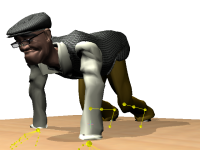
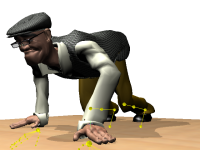
The floor contact engine effectively prevents local deviations of your character’s limbs, snapping them to the surface of an oriented plane that you specify.
The following sections contain general information about how the foot and hand contact engine works internally. For a complete procedure detailing how to set up foot and hand contact, see Setting up Foot and Hand Contact.
Feet and hands
HumanIK considers your character’s feet and hands to be equivalent for the purposes of floor contact. Both types of joints use exactly the same solving process, and the same configuration options are available for both. Only the names of the configuration properties are different, to reflect the body parts involved. However, despite this similarity in the way HumanIK treats your character’s joints internally, the needs of each skeleton typically results in different configuration settings for feet and hands.
When you set up foot or hand contact, you provide HumanIK with a rough outline of the shape of your character’s feet and hands by providing a set of measurements relative to either the ankle/wrist joint or the foot/hand joint. From these measurements, HumanIK calculates a set of markers around the outline. When foot and hand contact is enabled, HumanIK keeps all of these markers above the plane at all times, deviating the ankle/wrist joint and the rest of the character’s skeleton as necessary.
For details on the possible approaches for providing HumanIK with the dimensions of your character’s feet and hands, see Contact Types.
Both of your character’s feet share the same dimensions and configuration properties, and both of your character’s hands share another set of dimensions and configuration properties. You cannot configure different settings for your character’s left and right feet, or for its left and right hands. You can, however, set a different floor orientation for each limb; for example, your character’s left foot can rest on a ramp while its right foot rests on a level surface, or your character’s two hands can contact two different walls.
Toes and fingers
If your character’s skeleton contains individual fingers and toes, you can also enable toe and finger contact for your character. When toe or finger contact is enabled, HumanIK maintains a spherical marker at the end of each toe or finger. You can configure the size of this marker for each toe or each finger individually. No part of these spherical markers are ever allowed to pass through the plane.
Toe and finger contact are optional extensions to foot and hand contact; you cannot enable only toe contact without also enabling foot contact, or only finger contact without hand contact. In addition, you cannot enable or disable toe and finger contact on a per-digit basis; enabling or disabling toe or finger contact applies to all your character’s toes or fingers at once.
Other joints
It is important to note that the foot and hand contact engine does not prevent any other joints in your character’s skeleton from crossing the plane. You should be careful not to place your Effectors too far below the level of the floor or too far behind the surface of a wall, as this may lead to other joints, such as knees or elbows, passing through the plane even though the feet or hands do not. In extreme cases, this may result in the floor contact engine snapping your character’s feet and hands to the wrong side of the surface.
Approximate and final solving
The HumanIK inverse kinematics solver performs foot and hand contact in two passes. At the beginning of the solving process, before it invokes the Pull engine, it performs a fast approximation of the final desired result for contact. This initial pass helps to prevent the Pull engine from dragging other body parts through the planes defined for foot and hand contact. At the end of the solving process, after creating new positions for all of the character’s limbs, the inverse kinematics solver re-calls the floor contact engine to refine the contact between the character and the planes defined for foot and hand contact.
Topics in this section
 Except where otherwise noted, this work is licensed under a Creative Commons Attribution-NonCommercial-ShareAlike 3.0 Unported License. Please see the Autodesk Creative Commons FAQ for more information.