Available in Inventor 2016 R3 - Subscription customers
By default, Connected Design on A360 functionality is loaded and visible at the bottom of the graphics window in Inventor 2016 R3.
To turn off/on the visibility of Connected Design on A360

On the ribbon View tab, Windows panel, in the User Interface drop-down list, select, or clear the check box for Connected Design on A360.
To unload/load Connected Design on A360
Unloading the
Connected Design on A360 add-in removes the Design Share button
from the graphics window.
- In Inventor 2016 R3: On the ribbon, click Tools tab Options panel Add-ins.
-
In the Add-in Manager dialog box, double-click the name Connected Design on A360 in the list to switch between Loaded and Unloaded, or between Startup/Loaded and Startup/Unloaded.
Note: If Connected Design on A360 is not in the add-list, right-click and select Show Hidden Members.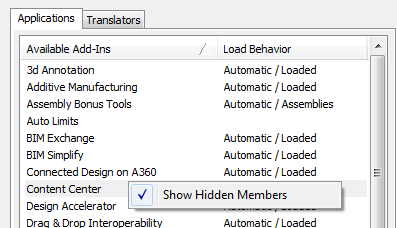
- Restart Inventor for your changes to take effect.