Right-click on Deformed inside a subcase and select Edit.
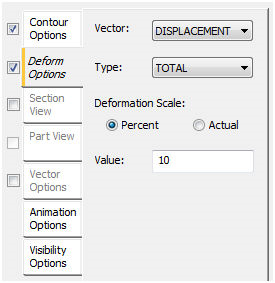
The Deformed Options tab has the following main sections:
-
Vector:
- Currently, only Displacement and Constraint Force vector components are supported to be displayed for the deformed model.
-
Type:
- TOTAL, TX, TY, TZ, RX, RY, RZ can be selected to be displayed for the deformed model.
-
Deformation Scale:
- Percent: This option sets the scale for all deformations based on the largest dimension of the model.
- Actual: This option sets the scale of the deformations as a direct factor of the actual deformations calculated in the model.
-
Value:
- This factor will be used to scale all the deformations for plotting the deformed model.