Right-click on Displacement in a subcase and select Edit. Click on the Visibility Options tab and the form looks as shown in the figure below.
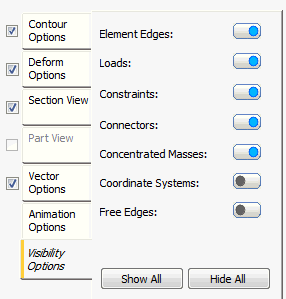
These options allow you to switch the symbols on and off using the flip button:
-
Element Edges:
- This option, when set to ON (blue), displays the element edges.
-
Loads:
- This option, when set to ON (blue), displays the loads.
-
Constraints:
- This option, when set to ON (blue), displays the constraints.
-
Connectors:
- This option, when set to ON (blue), displays the connectors.
-
Concentrated Masses:
- This option, when set to ON (blue), displays the concentrated masses.
-
Coordinate Systems:
- This option, when set to ON (blue), displays the coordinate systems.
-
Free Edges:
- This option, when set to ON (blue), displays the free edges for shell elements.