The Groups tree item is shown in the following figure:
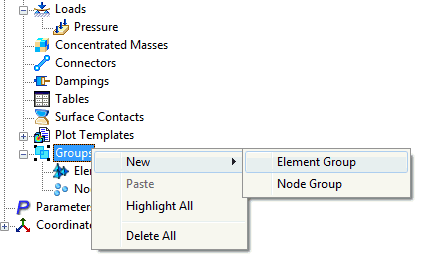
Right-click on Groups. The following options are available:
-
New:
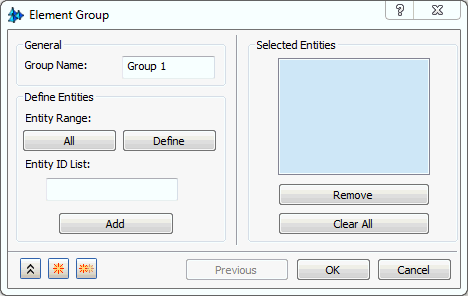
- Element Group: Type in the element IDs in the Entity ID List and click on the Add button to put them in the Selected Entities box as shown in the figure below.
- From Highlight Elements dialog, the selected entities can be included in the group by clicking the Create Group checkbox. (Refer to Highlight Elements in Total Elements section.)
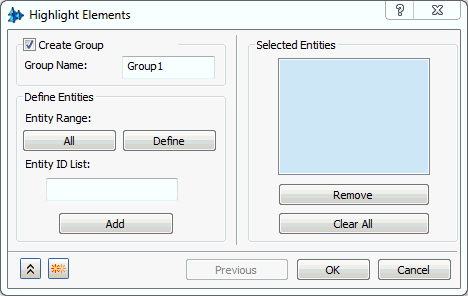
- From Highlight Elements dialog, the selected entities can be included in the group by clicking the Create Group checkbox. (Refer to Highlight Elements in Total Elements section.)
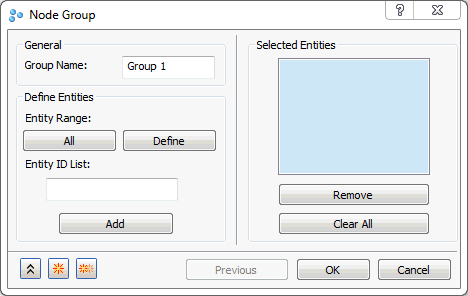
- Node Group: Type in the node IDs in the Entity ID List and click on the Add button to put them in the Selected Entities box as shown in the figure below.
- From Highlight Nodes dialog, the selected entities can be included in the group by clicking the Create Group checkbox. (Refer to Highlight Nodes in Total Nodes section.)
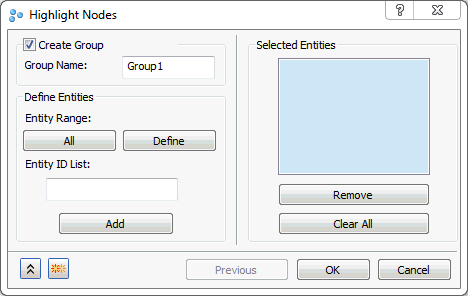
- From Highlight Nodes dialog, the selected entities can be included in the group by clicking the Create Group checkbox. (Refer to Highlight Nodes in Total Nodes section.)
- Element Group: Type in the element IDs in the Entity ID List and click on the Add button to put them in the Selected Entities box as shown in the figure below.
- Highlight All: Highlight Groups command can also be accessed using the Groups toolbar.
- Delete All: Allows you to delete all the groups created.
 Currently Groups is supported in Auto Surface Contact and XY Plot dialog and for highlighting nodes and elements purpose. In future versions it will be fully supported in all selection dialogs.