Click on the Global button under the Mesh panel on the ribbon or right-click on Mesh Model and select Edit.

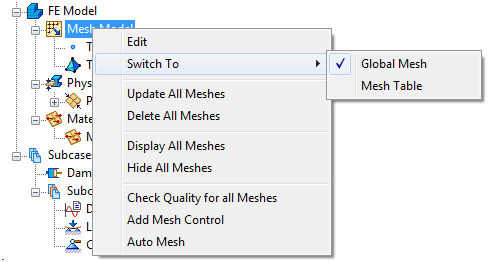
The Mesh form in the figure below comes up, since this is the default selection for the Edit command.
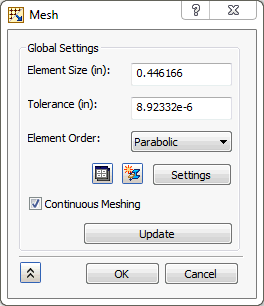
- Element Size: Global element size of the model. This field initially has a default size that changes based on the model's dimensions.
- Tolerance: Adjusting this mesh tolerance value will help you mesh parts that otherwise fail to mesh.
- Element Order: Parabolic or linear elements.
- Mesh Table icon
 allows you to switch from Global Mesh to Mesh Table.
 - New Physical Property icon
 will allow you to create a new physical property.
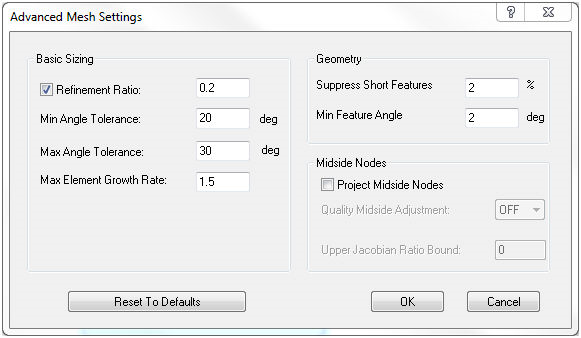
 - Settings button allows you to define more Advanced Mesh Settings for individual mesh, as shown in the picture below.
-
Basic Sizing:
- Refinement Ratio: Changes the mesh size to create more uniformity. Mesh element size deforms along with edges, curves, holes, bumps, etc. The larger the refinement ratio, the larger the mesh size.
- Min Angle Tolerance: Governs how much the mesh elements’ minimum angles are allowed to vary.
- Max Angle Tolerance: Governs how much the mesh elements’ maximum angles are allowed to vary. As max angle tolerance increases, a more uniform distribution of meshing is produced.
- Max Element Growth Rate: As growth factor increases, mesh element size increases. The smaller mesh elements become more and more concentrated to the entity (holes, bumps, etc) as growth factor increases.
-
Geometry:
- Suppress Short Features: Suppresses or covers up small features, such as holes, bumps, etc.
- Min Feature Angle: Controls the angle of mesh elements around different features such as edges, holes, bumps, etc.
-
Midside Nodes:
- Project Midside Nodes: Adds midside nodes to meshes. Elements along curves and edges are affected. If turned off, full mesh lines may not be completely visible.
- Quality Midside Adjustment: Controls midside adjustment and adjusts mesh if necessary.
- Upper Jacobian Ratio Bound: Ratio that governs quality midside adjustment.
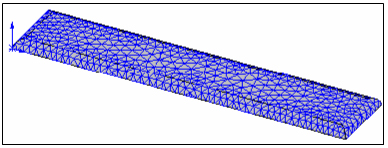
The following figures illustrate some mesh types.
Combined plane mesh with Quadrilaterals and Triangles:
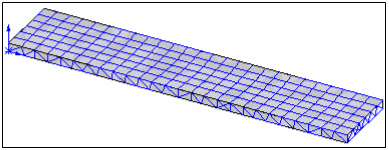
Solid mesh:
-
Basic Sizing:
- Continuous Meshing: This checkbox will enable the continuous meshing in case of Shell elements and it will merge the nodes within the tolerance specified for Solid elements.
- Update button will mesh that part.
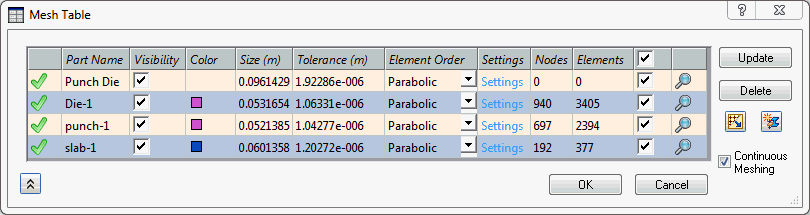
If Mesh Table is selected under Switch To and then you select Edit under Mesh Model, or click on Table button on the ribbon bar, the following form comes up:

- This icon
 shows that a particular part is meshed.
 - Part Name: Provides the information of parts added in the Mesh Table.
- Visibility: Checkbox that will allow you to switch the mesh ON and OFF on the respective part.
- Color: Shows the physical property color assigned for the particular part as mesh.
- Size: Global element size of the model. This field initially has a default size that changes based on the model's dimensions.
- Element Order: Parabolic or linear elements.
- Settings: Allows you to define more advanced mesh settings, as described above, under the Global Mesh section.
- Nodes and Elements: It gives the number of nodes and elements in the respective part mesh.
- This checked
 icon will enable the
  button and clicking on it will mesh that part.
 - This checked icon will enable the
 button and clicking on it will delete the mesh of that part.
 - Zoom icon
 zooms that particular part.
 - This icon
 allows you to switch from Mesh Table to Global Mesh.
 - New Physical Property button will allow you to create a new physical property.
- Continuous Meshing: This checkbox will enable the continuous meshing in case of Shell elements and it will merge the nodes within the tolerance specified for Solid elements.