The Autodesk Simulation Job Manager provides real-time status information for jobs run with Autodesk Simulation Flex products. You can use the Simulation Job Manager to perform the following tasks:
- Monitor the status of simulations running in the cloud.
- Stop simulations that are running.
- Run simulation jobs in the background, and download results even when your product is not running locally.
For cloud solutions, the Simulation Job Manager compresses and encrypts the model, and transfers it to the Autodesk® secure storage service.
- As the job is executed, results are placed in the Autodesk® secure storage service.
- As the job progresses, the Simulation Job Manager transfers the results and simulation progress information to the local workstation as they become available.
- When the job finishes, the Simulation Job Manager transfers the final results to the local workstation. You can review and visualize your results, and proceed with your design process.
Throughout this process, you can use the Simulation Job Manager to track each step of the solution.
To open the Simulation Job Manager
- From the ribbon, click
 ().
(). - From the Windows® Start menu, click .
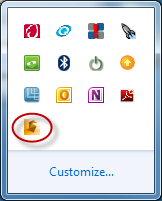
- From the Notification Area, click the Autodesk Simulation Job Manager icon:
Note: When you have exceeded the number of jobs available to your account, the Simulation Job Manager issues an error message indicating that you need to add additional job Cloud Credits to run the job. From this dialog, you can access your Autodesk 360 account page.