The Symbol Service feature is designed to simplify access to the different debugger features provided for symbols. Most facilities available for symbols are also available through this feature.
To open a Symbol Service dialog box and update a symbol
-
 Highlight the name of any symbol in your program's source code or in the Console window.
 - Click View
 Symbol Service from the VLISP menu bar, or click the Symbol Service button on the Debug toolbar.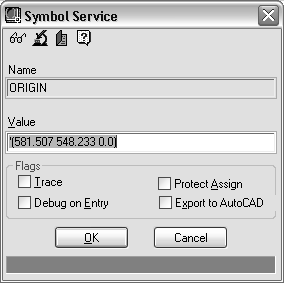
The Symbol Service dialog box contains the following components:
- A toolbar
- A Name field, where you can enter or change the symbol to work on
- A Value field that displays the symbol's value or its initial substring
- A series of check boxes for symbol flags
- To update the value of the displayed symbol, enter an expression in the Value field. When you click OK, VLISP evaluates the expression and assigns its value to the symbol.
If the symbol you specified is a protected symbol, the Value field will be read-only. To remove protection, clear the Protect Assign check box. See About Symbol Flags (AutoLISP) for more information on Protect Assign.
Use the OK and Cancel buttons to close the dialog box and to continue working in VLISP.