Autodesk 3ds Max Extension 1 には、Max クリエーション グラフに対するいくつかの新機能と改良が含まれています。
MCG アニメーション コントローラ
MCG を使ってカスタム アニメーション コントローラを作成し、グラフに基づいてオブジェクトのアニメート可能なパラメータを設定できます。[出力](Outputs)カテゴリには、フロート、位置、回転、変換などのさまざまなコントローラ タイプ用の新しいノードがあります。新しい暗黙的なパラメータ、Transform Controller: Matrix を使って、計算で使用する親オブジェクトの値を取得することもできます。
MCG ベースのコントローラが正常に作成され、評価されると、それらは[トラック ビュー](Track View)パネル、および[モーション](Motion)パネル内の適切な[コントローラを割り当て](Assign Controller)ウィンドウに自動的に表示されます。
いくつかのサンプルのコントローラを使用できます。それらは、メニューから適用することができ、またはそれらを独自のコントローラを作成するためのサンプルとして使用することもできます。
時間に関連するノード
- 新しい[3ds Max タイム](3ds Max Time)カテゴリのすべてのノード。
- [3ds Max タイム](3ds Max Time)カテゴリの MeshFromNodeAtTime。
- [3ds Max ノード](3ds Max Nodes)カテゴリの WorldTransformAtTime。
- [暗黙的なパラメータ](Implicit parameters)カテゴリの time:int32。
シミュレーション
MCG で、前のフレームの値に基づいて反復的に更新されるシミュレーションを作成できるようになりました。モディファイヤ、コントローラ、ジオメトリのシミュレーション グラフを作成することができます。
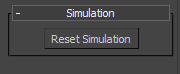
シミュレーション グラフで作成されたツールには、追加の[シミュレーション](Simulation)ロールアウトがあります。[シミュレーションをリセット](Reset Simulation)をクリックすると、キャッシュがクリアされ、シミュレーションは最初から現在の時間まで再実行されます。これはたとえば、任意のツールの入力を修正したときに、現在のフレームの正しい結果を確認したい場合に役立ちます。
詳細については、「シミュレーション グラフの作成」を参照してください。
Bullet Physics
Bullet Physics カテゴリには、Bullet Physics エンジンに基づいてリジッド ボディ シミュレーションを作成するすることができるノードが含まれています。ワールドを作成してそれにオブジェクトとプロパティを追加し、ワールドが更新された後でワールド空間の変換を取得できます。
[MCG 1 DOF 回転スプリング コントローラ](MCG 1 DOF Rotation Spring Controller)および[MCG 3 DOF 回転スプリング コントローラ](MCG 3 DOF Rotation Spring Controller)などのいくつかの MCG ベースのサンプル コントローラは、Bullet Physics ノードを使用して構築されたシミュレーションのサンプルです。
Bullet Physics ノードを使用して独自のシミュレーションを作成する方法の概要については、「バレット リジッド ボディ シミュレーションを作成する」を参照してください。
新しいパラメータ タイプ
- Parameter: IArray<INode> は、シーン内のオブジェクトの配列を指定します。
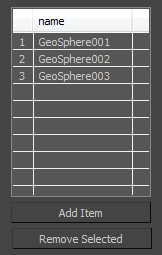
- Parameter: IArray<Single> は、浮動小数点値の配列を指定します。
- Parameter: Vector3 は、3D ベクトルを指定します。グラフで 3 つのシングル パラメータを使用してベクトルを構築する必要はなくなりました。
Vector4 サポート
4D ベクトルがサポートされています。XYZW および RGBA アニメーション コントローラを構築するためのOutput: Point4 コントローラに加え、Vector4 のノードを使用して、シングルから vector4 の値の構築、vector4 からシングルの値の取得、vector4 とクォータニオン間の変換を行えます。
特定のタイプの空の配列を作成
[配列](Arrays)カテゴリの新しい *EmptyArray ノードにより、配列に特定の項目を追加する必要なく、Matrix や Vector3 などのさまざまなタイプの配列を作成できます。
新しいオペレータと合成
MCG で使用可能な新しいオペレータと合成のリストを以下に示します。
3ds Max ノード
-
GetRayToSurfaceIntersections(nodes, rayToSurfacePivot, rayOrigin, flipAxis, rayAxis)
-
MeshFromNodeAtTime(n, time)
-
NodePosAverage(values)
-
WeightedAveragePosition(Targets, Weights)
-
WorldTransformAtTime(node, time)
3ds Max の時間
-
AnimationPlaybackEnd()
-
AnimationStartTime()
-
FramesToSeconds(frames)
-
FramesToTicks(frames)
-
SecondsToFrames(seconds)
-
SecondsToTicks(seconds)
-
TicksToFrames(ticks)
-
TicksToSeconds(ticks)
配列
-
BitmapEmptyArray()
-
BooleanEmptyArray()
-
BoundingBoxEmptyArray()
-
BoundingFrustumEmptyArray()
-
BoundingSphereEmptyArray()
-
ConstraintEmptyArray()
-
EdgeEmptyArray()
-
Face3EmptyArray()
-
Face4EmptyArray()
-
INodeEmptyArray()
-
Int32EmptyArray()
-
LineEmptyArray()
-
MapChannelEmptyArray()
-
MatrixEmptyArray()
-
PlaneEmptyArray()
-
QuadMeshEmptyArray()
-
QuaternionEmptyArray()
-
RandomEmptyArray()
-
RayEmptyArray()
-
RayTraceIntersectionEmptyArray()
-
RayTraceSceneEmptyArray()
-
RectangleEmptyArray()
-
RigidBodyDynamicsEmptyArray()
-
SingleEmptyArray()
-
StringEmptyArray()
-
TexmapEmptyArray()
-
TriMeshEmptyArray()
-
Vector3EmptyArray()
-
WorldEmptyArray()
Bullet Physics
-
AddBulletObject(world, worldObject)
-
AddConstraint(world, constraint)
-
AddRigidBody(world, rigidBody)
-
CreateGeneric6DofConstraint(rigidBody1, frame1, rigidBody2, frame2, rotationOrder)
-
CreatePoint2PointConstraint(rigidBody1, pivot1, rigidBody2, pivot2, tau, damping)
-
CreatePointConstraint(rigidBody, pivot, tau, damping)
-
CreateRigidBody(xform, offset, convexHull, rigidBodyDynamics, localInertia, isKinematic)
-
CreateRigidBodyDynamics(mass, friction, rollingFriction, restitution, linearDamping, angularDamping)
-
CreateWorld(initialTime)
-
GetCenterOfMass(convexHull)
-
GetNumberOfRigidBodies(world)
-
GetRigidBodyByIndex(world, index)
-
GetRigidBodyConvexHull(rb)
-
GetRigidBodyWorldTransform(world, rb)
-
GetSimulationTime(world)
-
IsRigidBodyKinematic(rb)
-
ResetWorld(world)
-
SetGeneric6DofConstraintAngularDynamics(constraint, damping, bounce, stiffness)
-
SetGeneric6DofConstraintAngularLimit(constraint, lower, upper, reversed)
-
SetGeneric6DofConstraintLinearDynamics(constraint, damping, bounce, stiffness)
-
SetGeneric6DofConstraintLinearLimit(constraint, lower, upper)
-
AddConstraint(world, constraint)
-
SetGravity(world, gravity)
-
SetRigidBodyVelocity(rb, linear, angular)
-
SetRigidBodyWorldTransform(world, rb, m)
-
SetSimulationTime(world, time)
-
StepSimulation(world, step)
-
TraceRigidBody(world, rb)
合成
-
CreateSimulation(constraints, rigidBodies, startTime, gravity, active, preUpdateFn, currentTime)
-
FilterAndSortRayIntersections(intersections, rays)
コントロール フロー
-
IfSingleGreaterThanZero(Value, True, False)
-
LimitSingle(Value, LimitOne, LimitTwo)
-
SwitchOneTwoThree(switchValue, valueIfOne, valueIfTwo, valueIfThree)
ジオメトリ - 行列
-
CanDecompose(matrix)
-
ConstructBasisFromUpFwd(upAxis, targetUp, forwardAxis, targetForward)
-
Determinant(matrix)
-
FlipMatrixBasis(matrix)
-
GetMatrixRotation(matrix)
-
GetMatrixScaling(matrix)
-
SetMatrixFrom3Rows(Row1, Row2, Row3)
ジオメトリ - Ray
-
RayFromMatrices(origin, destination)
-
RayFromMatrixAxis(origin, flipAxis, axis)
-
RayIntersectsBox(ray, box)
-
RayIntersectsPlane(ray, plane)
-
RayIntersectsSphere(ray, sphere)
ジオメトリ - TriMesh
-
GetMapChannel(mesh, id)
-
GetMapChannelName(id)
ジオメトリ - Vector4
-
QuaternionToVector4(q)
-
Vector4(x, y, z, w)
-
Vector4ToQuaternion(v)
-
Vector4W(v)
-
Vector4X(v)
-
Vector4Y(v)
-
Vector4Z(v)
ジオメトリ - ベクトル
-
NormalizedCross(v1, v2)
-
NormalizedCrossWithFlip(Flip, VecOptFlipped, Vec2)
-
PerpToVecInPlane2ndVec(Flip, Vec, Vec2FirstCross)
-
VecNegateIf(Condition, Vec)
暗黙的なパラメータ
-
Reference Maker: ReferenceMaker()
-
Time: Int32()
-
Transform Controller: Matrix()
入力
-
Input: cache()
-
Input: Constraint()
-
Input: RigidBodyDynamics()
-
Input: World()
出力
-
Output: Color Controller(value)
-
Output: Float Controller(value)
-
Output: Point3 Controller(value)
-
Output: Point4 Controller(value)
-
Output: Position Controller(value)
-
Output: Rotation Controller(value)
-
Output: Scale Controller(value)
-
Output: Transform Controller(value)
パラメータ
-
Parameter: IArray<INode>()
-
Parameter: IArray<Single>()
-
Parameter: Vector3()
パススルー
-
Pass-through: cache(x)
-
Pass-through: Constraint(x)
-
Pass-through: RigidBodyDynamics(x)
-
Pass-through: World(x)
タプル
-
NodeSingleTupleFirst(Tuple2)
-
NodeSingleTupleSecond(Tuple2)