Revit API は、Revit Structure の面配筋とパス配筋を表すクラスを提供します。
AreaReinforcementCurves を表す ElementId の IList を返す GetBoundaryCurveIds()メソッドを呼び出して、AreaReinforcement の AreaReinforcementCurves を検索します。
AreaReinforcement.GetBoundaryCurveIds()メソッドは、AreaReinforcementCurves を表す ElementId のセットを返します。これには Curve を返すプロパティがありますが、PathReinforcement.GetCurveElementIds()メソッドは、ModelCurves を表す ElementId の集合を返します。PathReinforcement.Create()メソッドを使用して作成する以外の方法では、PathReinforcement をフリップすることはできません。PathReinforcment は曲線の配列複写を使用することでのみ作成できます。
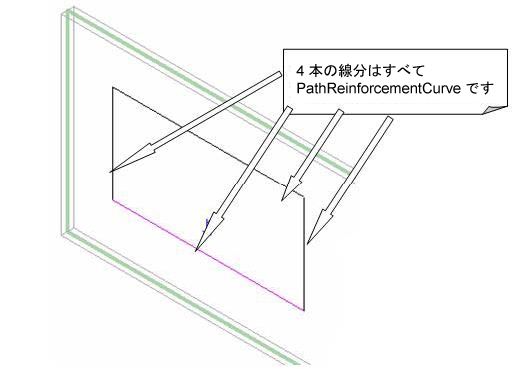
図 155: 編集モードの PathReinforcement ModelCurves
面配筋を作成する
要素のジオメトリの取得の詳細は、「ジオメトリ」を参照してください。
オーバーロードされた AreaReinforcement.Create()メソッドには、ホスト境界または曲線の配列複写に基づいた、新しい AreaReinforcement を作成するための 2 つの方法があります。面配筋の主筋方向は、オーバーロードされた Create()メソッドのいずれかを使用して新しい AreaReinforcement を作成するときに設定できますが、AreaReinforcment.Direction プロパティは読み込み専用です。
|
コード領域 29-3: 面配筋を作成 |
AreaReinforcement CreateAreaReinforcementInWall(Wall wall, Autodesk.Revit.DB.Document document)
{
    // Get the wall analytical profile whose curves will define the boundary of the the area reinforcement
    AnalyticalModel analytical = wall.GetAnalyticalModel() as AnalyticalModel;
    if (null == analytical)
    {
        throw new Exception("Can't get AnalyticalModel from the selected wall");
    }

    IList<Curve> curves = analytical.GetCurves(AnalyticalCurveType.ActiveCurves);

    //define the Major Direction of AreaReinforcement,
    //we get direction of first Line on the Wall as the Major Direction
    Line firstLine = (Line)(curves[0]);
    XYZ majorDirection = new XYZ(
        firstLine.GetEndPoint(1).X - firstLine.GetEndPoint(0).X,
        firstLine.GetEndPoint(1).Y - firstLine.GetEndPoint(0).Y,
        firstLine.GetEndPoint(1).Z - firstLine.GetEndPoint(0).Z);

    // Obtain the default types
    ElementId defaultRebarBarTypeId = document.GetDefaultElementTypeId(ElementTypeGroup.RebarBarType);
    ElementId defaultAreaReinforcementTypeId = document.GetDefaultElementTypeId(ElementTypeGroup.AreaReinforcementType);
    ElementId defaultHookTypeId = ElementId.InvalidElementId;

    // Create the area reinforcement
    AreaReinforcement rein = AreaReinforcement.Create(document, wall, curves, majorDirection, defaultAreaReinforcementTypeId, defaultRebarBarTypeId, defaultHookTypeId);

    return rein;
}
|
パス配筋を作成する
|
コード領域 29-4: パス配筋を作成 |
PathReinforcement CreatePathReinforcement(Autodesk.Revit.DB.Document document, Wall wall)
{
    // Create a geometry line in the selected wall as the path
    List<Curve> curves = new List<Curve>();
    LocationCurve location = wall.Location as LocationCurve;
    XYZ start = location.Curve.GetEndPoint(0);
    XYZ end = location.Curve.GetEndPoint(1);
    curves.Add(Line.CreateBound(start, end));

    // Obtain the default types
    ElementId defaultRebarBarTypeId = document.GetDefaultElementTypeId(ElementTypeGroup.RebarBarType);
    ElementId defaultPathReinforcementTypeId = document.GetDefaultElementTypeId(ElementTypeGroup.PathReinforcementType);
    ElementId defaultHookTypeId = ElementId.InvalidElementId;

    // Begin to create the path reinforcement
    PathReinforcement rein = PathReinforcement.Create(document, wall, curves, true, defaultPathReinforcementTypeId, defaultRebarBarTypeId, defaultHookTypeId, defaultHookTypeId);
    if (null == rein)
    {
        throw new Exception("Create path reinforcement failed.");
    }

    // Give the user some information
    TaskDialog.Show("Revit","Create path reinforcement succeed.");

    return rein;
}
|
新しい PathReinforcement に鉄筋形状 ID を指定する場合、プロジェクトに鉄筋形状がないときや、はじめに鉄筋形状を考慮していなかったときは、静的 PathReinforcement メソッドである GetOrCreateDefaultRebarShape()を使用して PathReinforcement に使用する有効な鉄筋形状を取得できます。既存の鉄筋形状がパス配筋で使用できるかどうかを確認する場合は、静的メソッド PathReinforcement.IsValidRebarShapeId()を呼び出します。
PathReinforcement プロパティの PrimaryBarShapeId と AlternatingBarShapeId を使用して、新しい形状タイプを照会したり、パス配筋に割り当てます。静的メソッド IsValidRebarShapeId()を使用すると、形状 ID をパス配筋オブジェクトに設定する前に、有効な形状があるかどうかを判断できます。交互鉄筋を設定する前に、PATH_REIN_ALTERNATING BuiltInParameter を true に設定して、Path Reinforcement で交互鉄筋パラメータを有効にする必要があります。
ReinforcementBarOrientation 列挙値から値を取得するプロパティ PrimaryBarOrientation と AlternatingBarOrientation を使用して主筋と交互鉄筋の向きを照会したり、設定します。クラス メソッド IsValidPrimaryBarOrientation() か IsValidAlternatingBarOrientation() を呼び出すと、特定のパス配筋オブジェクトに対して向きが有効かどうかをチェックできます。
交互のレイヤの状態を照会する場合は、IsAlternatingLayerEnabled()メソッドを呼び出します。交互のレイヤは、パス配筋要素の組み込みパラメータ PATH_REIN_ALTERNATING を使用してコントロールします。