통합 단계 6: NavData 생성 API 사용
대부분의 프로젝트에서 NavData 생성을 자체 레벨의 설계 도구 또는 게임 편집기로 직접 통합하려고 합니다. 이 통합은 아티스트 또는 설계자가 해당 레벨을 변경할 때마다 최신 NavData가 항상 자동으로 생성되고 빌드에 적용되도록 합니다.
이 항목에서는 NavData를 프로그래밍 방식으로 생성하기 위한 주요 단계를 소개합니다.
프로젝트 설정
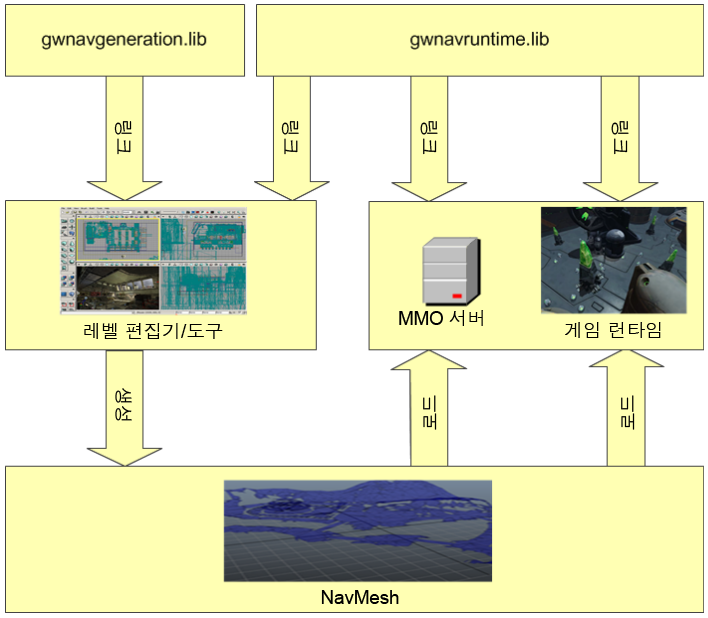
통합 단계 1a: 포함, 라이브러리 및 사전 프로세서 정의에 설명된 런타임 게임에 대한 지침을 따릅니다. 또한 gwnavruntime과 동일한 디렉토리에서 제공되는 gwnavgeneration 라이브러리를 링크해야 합니다.
다음 그림에 나와 있는 대로 레벨 편집기 및 게임 런타임에 라이브러리를 링크해야 합니다.
이 튜토리얼에서는 DefaultGeneratorGlue 클래스를 사용하여 생성 시스템에 대한 병렬 처리 서비스를 제공합니다. 이 클래스는 Intel의 TBB(Threaded Building Blocks) 라이브러리를 사용하여 여러 프로세서에서 계산을 분산시킵니다. Gameware Navigation SDK의 핵심 라이브러리에 타사 종속성이 도입되지 않도록 하기 위해 이 클래스와 관련 클래스의 헤더 및 소스는 integration 디렉토리에서 유지됩니다. DefaultGeneratorGlue를 사용하려면 다음을 수행해야 합니다.
- integration/gwnavgenerationglue 디렉토리의 모든 .h 및 .cpp 파일을 프로젝트에 추가합니다. 또는 solutions 디렉토리에 제공된 솔루션을 사용하여 이러한 파일을 gwnavgenerationglue라는 작은 라이브러리로 컴파일하고 해당 라이브러리를 링크할 수 있습니다.
- integration 디렉토리에서 포함 파일을 찾도록 컴파일러를 구성합니다.
- 3rd/tbb_version_date/lib의 하위 디렉토리에서 사용 가능한 TBB 라이브러리의 적절한 변형에 링크하도록 링커를 구성합니다.
- 3rd/tbb_version_date/bin의 하위 디렉토리에서 사용 가능한 TBB .dll 파일을 편집기 시작 시 액세스할 수 있도록 배치해야 합니다.
- Windows 플랫폼의 경우 모든 .dll 파일을 이 하위 디렉토리에서 응용 프로그램이 포함된 디렉토리로 복사합니다.
- Linux의 경우 이 하위 디렉토리를 LD_LIBRARY_PATH 환경 변수에 추가합니다.
- Mac OS X의 경우 이 하위 디렉토리를 DYLD_LIBRARY_PATH 환경 변수에 추가합니다.
GeneratorInputProducer 작성
GeneratorInputProducer 클래스의 구현을 작성해야 합니다. 이 클래스는 지형을 구성하는 삼각형이 있는 NavData 생성 시스템을 제공합니다.
여기에는 구현해야 하는 하나의 주요 가상 메서드인 GeneratorInputProducer::Produce()가 포함되어 있습니다. 생성 시스템은 지형의 섹터에 대한 NavData를 생성할 때마다 이 메서드를 호출하고 처리할 섹터에 대한 설명 및 삼각형으로 피드할 ClientInputConsumer 오브젝트를 전달합니다. 사용자의 GeneratorInputProducer::Produce() 구현에서는 사용자가 만든 섹터에 할당한 이름 또는 GUID를 포함하여 GeneratorSector 매개변수에 유지된 모든 데이터를 사용하여 피드해야 하는 삼각형을 확인합니다.
NavData를 섹터로 분할하는 방법에 대한 내용은 지세 섹터 지정을(를) 참조하십시오. 전체 게임 지형을 반영하는 NavData의 단일 섹터를 만들려면(예: 초기 통합의 경우) GeneratorInputProducer::Produce() 구현에서 지형 메시의 모든 삼각형으로 ClientInputConsumer 오브젝트를 피드하기만 하면 됩니다.
#include "gwnavgeneration.h"

class MyProducer : public Kaim::GeneratorInputProducer
{

public:
    virtual KyResult Produce(
            const Kaim::GeneratorSector& sector,
            Kaim::ClientInputConsumer& inputConsumer);
};

KyResult MyProducer::Produce(
            const Kaim::GeneratorSector& /* sector */,
            Kaim::ClientInputConsumer& inputConsumer )

{
    // A sector can contain your whole level, or a part of a level that you plan
    // to stream in and out at runtime. You can set up as many sectors as you need.
    // See the section on running a generation below.

    // A NavTag is an array of blind data that you can add on each triangle.
    // You can use this data to distinguish different materials that you want to
    // take into account during your runtime path finding and path following.
    Kaim::DynamicNavTag aNavTag;
    aNavTag.m_blindDataArray.PushBack(42);


    // Set up a CoordSystem object to match the system used in your editor.
    KyFloat32 oneMeterInClientUnits = 1.0f;
    Kaim::CoordSystem::ClientAxis clientRightAxis = Kaim::CLIENT_X;
    Kaim::CoordSystem::ClientAxis clienFrontAxis = Kaim::CLIENT_Y;
    Kaim::CoordSystem::ClientAxis clientUpAxis = Kaim::CLIENT_Z;

    Kaim::CoordSystem myCoordSystem;
    myCoordSystem.Setup(
        oneMeterInClientUnits,
        clientRightAxis,
        clienFrontAxis,
        clientUpAxis );

    // For each triangle in the sector, feed it to the input consumer.
    // How you retrieve the triangles is specific to your system.
    // If you have set up a CoordSystem as shown above, you can send your
    // triangles in your own coordinate system. The conversion is done internally
    // by the generation system.
    for(KyUInt32 index=0; index < myTriangleCount; index++)
    {
        inputConsumer.ConsumeTriangle(
                        myTriangle.Vertex[0],
                        myTriangle.Vertex[1],
                        myTriangle.Vertex[2],
                        aNavTag,
                        myCoordSystem);
    }
    return KY_SUCCESS;
}
ClientInputConsumer 오브젝트에는 여러 섹터 간에 공유되는 TagVolume 목록 및 시드 점 목록도 포함되어 있습니다. 생성 시스템에 시드 점을 제공하거나 3D 볼륨 내에서 NavMesh에 대한 태그를 지정해야 하는 경우 시드 점 및 볼륨을 이러한 목록에 추가하는 것이 좋습니다. 자세한 내용은 이동 가능한 영역 식별을(를) 참조하십시오.
BaseSystem 설정
런타임 게임과 같은 방식으로 응용프로그램에서 BaseSystem을 초기화하고 닫아야 합니다. 통합 단계 1b: BaseSystem 설정을(를) 참조하십시오.
NavData를 생성하기 위해 BaseSystem을 제대로 초기화하려면 GeneratorBaseSystem 클래스를 사용하면 됩니다. Kaim::BaseSystem::Init(config)를 호출하지 않고 간단하게 Kaim::GeneratorBaseSystem::Init(config)를 호출할 수 있습니다. Gameware Navigation은 생성 프로세스 중에 NavData 생성에만 유용한 데이터 구조를 사용합니다. 따라서 생성 전용 클래스를 제대로 등록하려면 GeneratorBaseSystem을 사용하는 것이 좋습니다.
생성 실행
생성 실행을 시작하는 데 중요한 컴포넌트는 Generator 클래스와 해당 GeneratorInputOutput 구성 클래스입니다.
GeneratorInputOutput 오브젝트를 만들고, 구성 매개변수로 설정하고, NavData를 생성할 지형의 각 섹터 또는 블록에 대한 정의를 추가합니다. 그런 다음 이 오브젝트를 Generator::Generate()에 대한 호출에서 전달하면 생성 프로세스가 시작됩니다.
#include "gwnavgenerationglue/defaultgeneratorglue.h"

bool Generate()
{
    // Create an instance of your GeneratorInputProducer class.
    Kaim::Ptr<MyProducer> producer = *KY_NEW MyProducer;

    // Create an instance of the DefaultGeneratorGlue.
    KyGlue::DefaultGeneratorGlue glue;

    // Set up a Generator to use your producer.
    Kaim::Generator generator(producer, &glue);

    // Set the output directory within which the .NavData and other output files
    // are created. You must use the same absolute root directory every time
    // you create a Generator, but you might set up a different relative directory for
    // each different level. This keeps all of your NavData easily accessible during
    // visual debugging.
    generator.SetOutputDirectory("c:/MyGame/NavData", "MyTestLevel");

    // Create a GeneratorInputOutput
    Kaim::GeneratorInputOutput generatorInputOutput;

    // Alternatively, you can create a GeneratorInputOutput by loading it from a
    // .GenIO file created during a previous generation run. This retains all
    // settings from the last run. You can also explicitly save your GeneratorInputOutput
    // object at any time by calling Kaim::GeneratorInputOutput::Save().


    // Use the Kaim::GeneratorParameters and Kaim::GeneratorAdvancedParameters
    // classes that are accessible through generatorInputOutput.m_params and
    // generatorInputOutput.m_params.m_advancedParameters to configure settings
    // such as, the dimensions and movemement capabilities of your characters.
    generatorInputOutput.m_params.m_entityRadius = 0.8f;
    generatorInputOutput.m_params.m_advancedParameters.m_navTagMinPixelArea = 4;

    // Use the Kaim::GeneratorRunOptions class that is accessible through
    // generatorInputOutput.m_runOptions to configure the operation of the
    // generation process itself.
    generatorInputOutput.m_runOptions. m_doMultiCore = true;

    // Add a sector.
    // It is recommended to create a unique GUID for each sector and
    // even to save it along with your own level definition. This ensures that you
    // always generate with the same GUID for a given level or block of terrain.
    // If you want to generate a random GUID, you can use the
    // KyGlue::DefaultGuidGeneratorInterface class.
    Kaim::Ptr<Kaim::GeneratorSector> sector = *KY_NEW Kaim::GeneratorSector(
            Kaim::KyGuid("AAAAAAAA-AAAA-AAAA-AAAA-AAAAAAAAAAAA"),
            "MyGameLevel");

    generatorInputOutput.AddSector(sector);


    // Run a generation using the configuration we have set up.
    if (Kaim::Result::Fail(generator.Generate(generatorInputOutput)))
    {
        return false;
    }
    return true;
}
각 섹터에 대해 생성 시스템은 Navigation Lab과 동일한 출력 파일 세트를 제공합니다. 이러한 출력 파일은 Generator에 대해 설정한 루트 디렉토리 아래의 하위 디렉토리에 배치되며, 해당 GeneratorSectorConfig에서 섹터에 대해 설정한 이름에 따라 이름이 지정됩니다. 여기에서 게임에 포함할 .NavData 파일을 검색할 수 있습니다.
출력 파일을 사용하는 대신, NavData를 원시 데이터 버퍼로 가져와 사용자 레벨의 다른 데이터와 함께 패키징하여 런타임 게임의 메모리 내/외부로 데이터를 스트리밍하는 프로세스를 삭제할 수 있습니다. 통합 단계 6a: 자산 파이프라인으로 NavData 통합을(를) 참조하십시오.
이 단원의 항목
 다른 설명이 없는 한, 이 저작물은 크리에이티브 커먼즈 저작자표시-비영리-동일조건변경허락 3.0 Unported 라이선스에 따라 이용할 수 있습니다.자세한 내용은 Autodesk 크리에이티브 커먼즈 FAQ (영문)를 참조하십시오.