통합 단계 4: 쿼리를 사용하여 런타임 시 경로 계산
이 통합 단계에서는 지세의 두 점간의 경로를 계산하기 위해 쿼리를 사용하는 방법을 배우게 됩니다. 도구상자 레이어에서 제공하는 쿼리에 대한 소개입니다.
Navigation Lab에서
먼저 Navigation Lab에서 쿼리가 수행되는 방법을 살펴보겠습니다.
- .NavData 파일을 Navigation Lab으로 드래그 앤 드롭합니다.
- NavMesh에서 경로의 시작 위치를 마우스 오른쪽 버튼으로 클릭하고 상황별 메뉴에서 Set Marker A를 선택합니다.
- 경로의 대상을 마우스 오른쪽 버튼으로 클릭하고 상황별 메뉴에서 Set Marker B를 선택합니다.
- 주 Navigation Lab 창의 왼쪽에 있는 Query Browser 패널을 열고 Astar 쿼리를 선택합니다.
- 주 Navigation Lab 창의 오른쪽에 있는 Attribute Editor 패널을 엽니다. 여기서 선택한 쿼리에 대한 매개변수를 설정할 수 있습니다.
Start 및 Dest 컨트롤을 PosA 및 PosB로 각각 설정합니다. 이렇게 하면 위치 A 마커에서 위치 B 마커까지 경로를 계산하려는 쿼리를 알려 줍니다.
- 이러한 위치 사이에 경로가 있는 경우 3D 보기에 녹색으로 그려집니다.
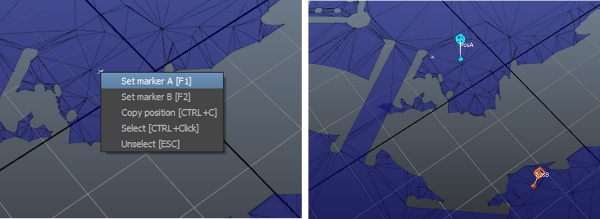
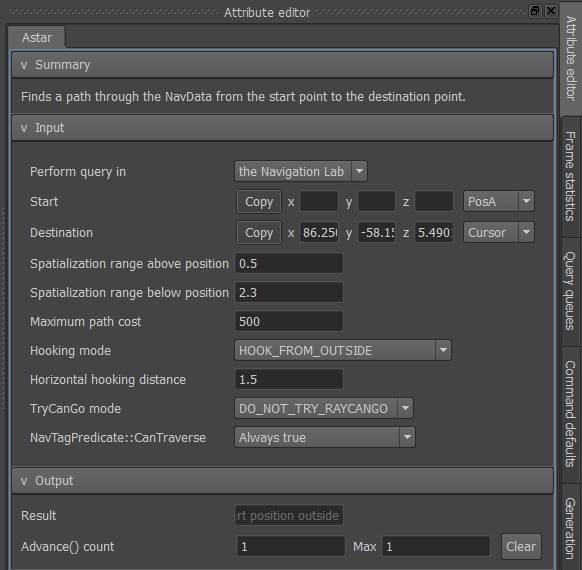
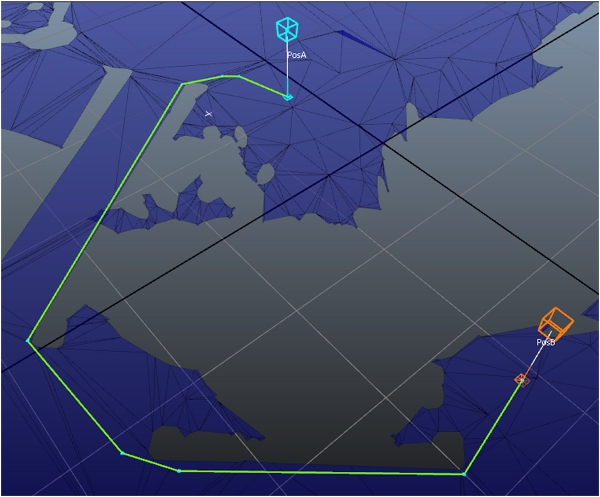
Navigation Lab에서 쿼리의 시작 및 끝점을 쉽게 검색할 수 있습니다. 주 창의 맨 아래에 Navigation Lab이 3D 공간의 A 및 B 마커의 위치를 나열합니다(Navigation 좌표계로 표현됨). Copy 버튼을 클릭하여 이러한 값을 클립보드에 복사합니다.

게임 코드에서
이제 AstarQuery 클래스의 인스턴스를 사용하여 런타임 시 게임에서 동일한 쿼리 복제를 시도해 볼 것입니다.
[Tutorial_FirstIntegration.cpp의 코드]
#include "gwnavruntime/queries/astarquery.h"
...

class MyGameLevel
{
public:
    ...
    void Update(float deltaTimeInSeconds);
    ...
    void TestAStarQuery(Kaim::World* world);
    ...
protected:
    ...
    Kaim::Ptr<Kaim::AStarQuery<Kaim::DefaultTraverseLogic> >  m_astarQuery; // Not used for the entity, but simply to demonstrate how to run a query
    ...
};
...

bool MyGameLevel::Initialize(Kaim::World* world)
{
    ...
    m_astarQuery = *KY_NEW Kaim::AStarQuery<Kaim::DefaultTraverseLogic>;
    m_astarQuery->BindToDatabase(world->GetDatabase(0));
    ...
}
...

void MyGameLevel::TestAStarQuery(Kaim::World* world)
{
    // Choose two positions (in Navigation space) you want to test.
    // You can use the Navigation Lab to choose them.
    Kaim::Vec3f startPos = Kaim::Vec3f(-11.5963f,1.06987f,10.4563f);
    Kaim::Vec3f destPos  = Kaim::Vec3f(-16.636f,-26.7078f,8.10107f);

    // Leverage the visual debugging system.
    Kaim::ScopedDisplayList displayList(world, Kaim::DisplayList_Enable);
    displayList.InitSingleFrameLifespan("Test AStar Query", "My Game");
    displayList.PushLine(startPos, startPos + Kaim::Vec3f::UnitZ(), Kaim::VisualColor::Blue);
    displayList.PushLine(destPos,  destPos  + Kaim::Vec3f::UnitZ(), Kaim::VisualColor::Blue);

    if(m_astarQuery->m_processStatus == Kaim::QueryNotStarted)
    {
        // Each AstarQuery must be set up to run on a specific Database.
        m_astarQuery->Initialize(startPos, destPos);

        // Blocking means that we want the result immediately.
        // Alternatively, a query can be asynchronous and time-sliced.
        m_astarQuery->PerformQueryBlocking();

    } else if (m_astarQuery->m_processStatus == Kaim::QueryDone)
    {
        // When the query is done, we ask for the result.
        Kaim::AStarQueryResult result = m_astarQuery->GetResult();

        // Kaim::AStarQueryResult enumerates many possible query results.
        // For now, let's focus on success.
        switch( result )
        {
        case Kaim::ASTAR_DONE_PATH_FOUND:
            {
                displayList.PushText(destPos + Kaim::Vec3f::UnitZ(), Kaim::VisualColor(0, 255, 0), "AStar query success !");
                break;
            }
        default:
            displayList.PushLine(startPos,  destPos , Kaim::VisualColor::Red);
            displayList.PushText(destPos + Kaim::Vec3f::UnitZ(), Kaim::VisualColor(255, 0, 0), "AStar query failed !");
            break;
        }

        // Here, we build and send a query, so it can be displayed into the NavigationLab.
        // cf. IQuery::SendVisualDebug() for more details.
        m_astarQuery->SendVisualDebug();
    }
}
...

void MyGameLevel::Update(float deltaTimeInSeconds)
{
    ...
    TestAStarQuery(m_entity.m_navBot->GetWorld());
    ...
}
...

void MyGameWorld::Update(float deltaTimeInSeconds)
{
    ...
    m_world->Update(deltaTimeInSeconds);
    m_gameLevel.Update(deltaTimeInSeconds);
}
다시 Navigation Lab에서
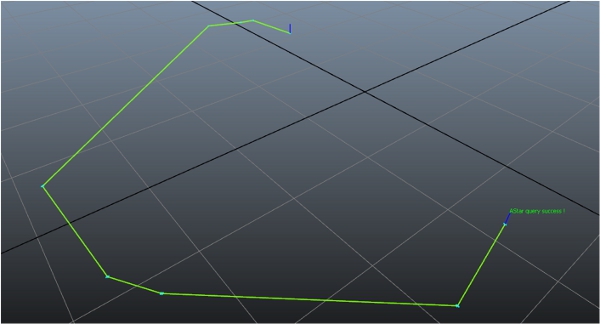
이제 게임에 연결할 때 쿼리로 계산된 경로가 3D 보기에 그려져 표시됩니다. NavMesh가 같고 A 및 B 마커에 대해 동일한 위치를 사용한다고 가정하면 결과로 나타나는 경로는 Navigation Lab에서 처음으로 쿼리를 실행했을 때 표시된 경로와 동일합니다.
이 단원의 항목
 다른 설명이 없는 한, 이 저작물은 크리에이티브 커먼즈 저작자표시-비영리-동일조건변경허락 3.0 Unported 라이선스에 따라 이용할 수 있습니다.자세한 내용은 Autodesk 크리에이티브 커먼즈 FAQ (영문)를 참조하십시오.