Weld template configuration (details) : The weld template is located in the Symbols folder, under the name: WeldTemplate.dwg.
Settings you can configure:
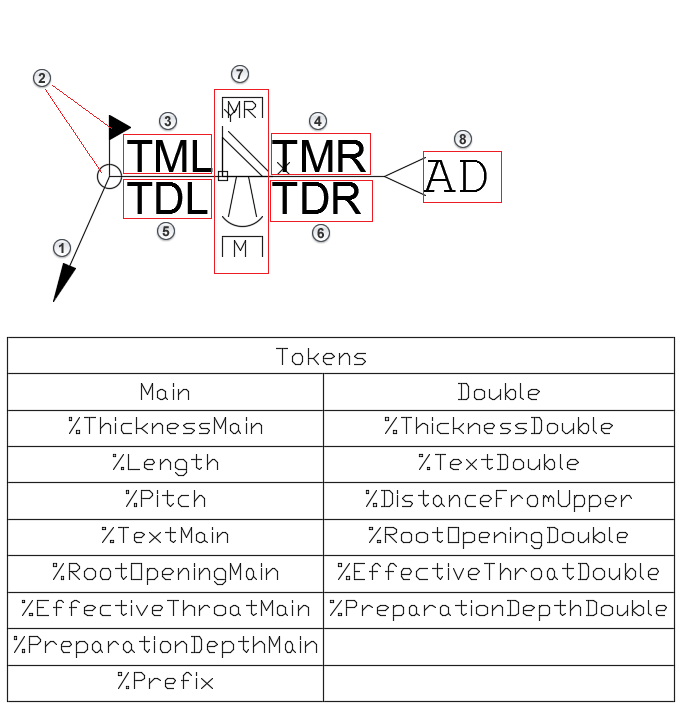
-
Leader: arrow, color, line type, line weight

-
Symbols (weld all around, site symbol, weld type, weld shape, weld preparation): color, design, position
 ,
,

Note: The symbols (,
) are correlated with layer names. Saving the symbol on a certain layer changes the design of the symbol. For welds these layer names are located in AstorBase.mdb  WeldType table - for enabling the welds in welds dialog also or in Management Tools Table Editor AstorBase WeldType .
,
) are correlated with layer names. Saving the symbol on a certain layer changes the design of the symbol. For welds these layer names are located in AstorBase.mdb WeldType table - for enabling the welds in welds dialog also or in Management Tools Table Editor AstorBase WeldType .
-
Main weld attribute text: displaying which weld information you want from the table below (left column), text color, text style, text position
 ,
,

-
Double weld attribute text: displaying which weld information you want from the table below (right column), text color, text style, text position
 ,
,

-
Additional text information: color, text style

Note: the weld text information placed in attributes shows the configured token if the information also exists in the weld dialog. Removing one of the tokens from attribute will also remove the information from the weld label, even if it's set in the weld dialog.
Note: for ISO standards, there is a template with orientation line which is installed with the English_International version of Advance Steel and you can choose between templates using Management Tools: Defaults Drawing-General General Default weld template file name: WeldTemplate.dwg or WeldTemplateOrientationLine.dwg.
Drawing-General General Default weld template file name: WeldTemplate.dwg or WeldTemplateOrientationLine.dwg.