Enhancements made to dimensioning tools in AutoCAD Mechanical 2013.
Edit Multiple Dimensions Simultaneously
You can now select multiple dimensions and edit them in the same way you edit a single dimension.
As soon as you select a dimension for editing, AutoCAD Mechanical displays the Power Dimensioning ribbon contextual tab. This contextual tab displays the properties of the selected dimension and provides the means to change them. When you select multiple dimensions, the contextual tab shows the value of the properties that have the same value across all the selected dimensions. The properties that are different are indicated to be in a mixed (or *VARIES*) state. If you change the value of a property, the change is applied across all selected dimensions.
Track Disassociated Dimensions
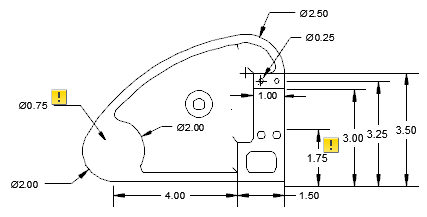
Dimensions can lose associativity for numerous reasons. For example, if a dimension is placed between an edge and a hole within a drawing view, and the hole is removed during a change to the model, the dimension loses associativity. A new feature named annotation monitor keeps track of dimensions that get detached due to drawing view changes. When the annotation monitor is on, it highlights detached dimension by displaying a badge next to the dimension. You can right-click the badge to display a menu that contains context sensitive options to resolve the issue. If required you can hide the badges by turning the annotation monitor off. Before update event |
 After update event |