Enhancements made to the annotation tools for drawing symbols, in AutoCAD Mechanical 2013.
Surface Texture Symbols
Surface Texture symbols are enhanced to support functionality to implement by more recent revisions of the ISO, DIN, BS, GB and JIS standards. The supported revisions are:
- · BS EN ISO 1302 - 2002
- · DIN EN ISO 1302 - 2002
- · GB/T 131 - 93
- · ISO 1302 : 2002(E)
- · JIS B 0031 : 2003 (ISO 1302 : 2002)
As per these revisions, the AMSURFSYM command now supports command line options to draw surface indication leaders. Accordingly, you are no longer restricted to specifying surface texture requirements on edges in a side view. You can now specify surface texture requirements on a surface in a top view.
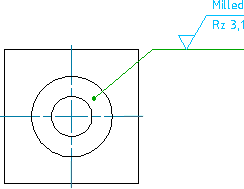
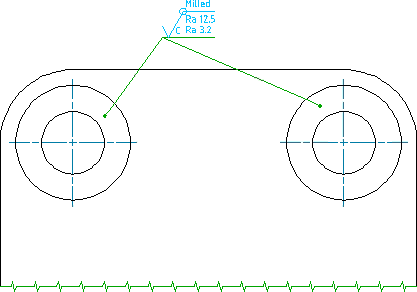
Leader Notes
Leader notes can now recognize spotfaces on model documentation drawing views generated from Inventor models.
The AMNOTE command supports a new category of templates entitled Hole - spotface. Default templates are available for all supported drafting standards. The references that apply to counterbores apply to spotfaces as well.
Symbol Attach Behaviour
Symbols now attach to edges within model documentation's drawing views. When you move the drawing view, all attached symbols move with it.
Symbols can get detached for numerous reasons. For example, if a symbol is attached to an edge within a drawing view, and due to a change made to the model, the edge within the drawing view is removed, the symbol is detached. A new feature named annotation monitor keeps track of symbols that get detached due to drawing view changes. When the annotation monitor is on, it highlights detached symbols by displaying a badge next to the symbol. You can right-click the badge to display a menu that contains context sensitive options to resolve the issue. If required you can hide the badges by turning the annotation monitor off.
 Before update event |
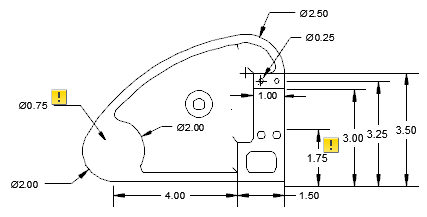 After update event |