In the Job Control , select a job from the list of all available jobs. You can use a filter to reduce the number of jobs that are displayed in the list.
To filter the jobs by job state
- From the Job Control, select Display Settings.
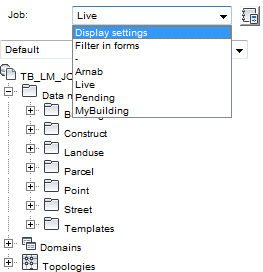
Display and filter settings are on the Job Control.
- In the Display Settings window, select the types of jobs to list. For example, select Open to see all open jobs.
To select a jobs using a filter
- From the Job Control, select Filter In Forms.
- In the TB_JOB feature class form, use the filter tools to search for the job.
- Click Select Job to select the job.
- Close the form.
Note: In a job enabled industry model, if you select the Live job you cannot modify any features.
You can now work with all topics and feature classes that are part of the selected job. If you have finished, you can change the job state, as for example to pending or you can delete your modifications.