This release introduces new features and enhancements that expand the our capabilities, enhance solution accuracy, and reduce time to solution.
Network License Manager upgrade
NLM can be installed from the product installer, using the Tools & Utilities option. If an earlier version of NLM is already installed on the server, uninstall that version. Install the new version into the folder where the old version was located. NLM must configure the license servers before any products can obtain licenses and start running. NLM can be installed either before or after the products that use it.
Network License Manager enhancements
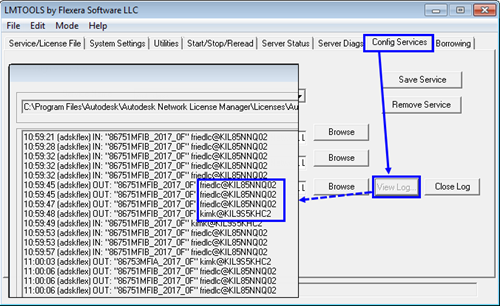
You can track license usage and see who has pulled the license, by checking the server log in LMTOOLS. In current Moldflow products, the NLM log displays the user as SYSTEM if the job was launched from Synergy. This enhancement enables NLM to display the user name for license checkouts, even if the job was launched from Synergy through the Job Manager. The NLM log now displays the job submitter's USERNAME@HOSTNAME for license checkouts regardless of where the job originated.
To check the log, you must have the Network License Manager installed on your computer. Open LMTOOLS, and click View Log on the Config Services tab.