Thermal analysis
From a command line run
$ pan -b 03_thermal
The analysis progress is written to file 03_thermal.out. To check progress on Linux, run:
$ tail 03_thermal.out
After the analysis completes, the last few lines of the output file 03_thermal.out should be similar to the following:
inc =      47 time =   17403.809   iter =  2 eps = 0.54554E-12
Increment end
inc =      48 time =   20157.731   iter =  1 eps = 0.42870E-01
inc =      48 time =   20157.731   iter =  2 eps = 0.12785E-13
Increment end
Analysis completed
CPU wall=  19.11719    CPU total=  279.5645
END PROJECT PAN
Actual CPU times will differ.
Quasi-static mechanical analysis
Run the analysis from the command line:
$ pan -b 03_mechanical
After the analysis completes, the last few lines of the output file 03_mechanical.out should be similar to the following:
Substrate removal time increment
inc =         49 time =     30157.731     iter = 1 eps = 0.15947E+05
inc =         49 time =     30157.731     iter = 2 eps = 0.87582E-09
Increment end
Analysis completed
CPU wall=     69.28516      CPU total=    1178.165
END PROJECT PAN
Actual CPU times will differ.
Results can be imported and viewed in ParaView. Figure 3.2 shows the computed final distortion before the part is removed from the substrate.
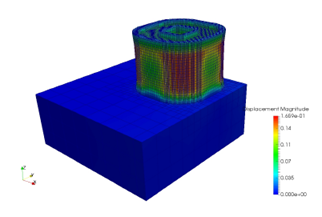
Figure 3.2 Final distortion