Export warped STL

Use this feature to create an STL file that is warped to account for the distortion that is predicted to occur in the manufacturing process. The intent is that the distortion of manufacture will warp the part into the desired final shape.
Note the following two requirements for using this feature:
- The simulation must be solved locally, not on the Cloud
- The user must select the feature on the Preview tab of the Settings dialog.
To use the feature, have a solved simulation open, then on the Results tab, click Warped STL and adjust the settings in the Export Warped STL dialog:
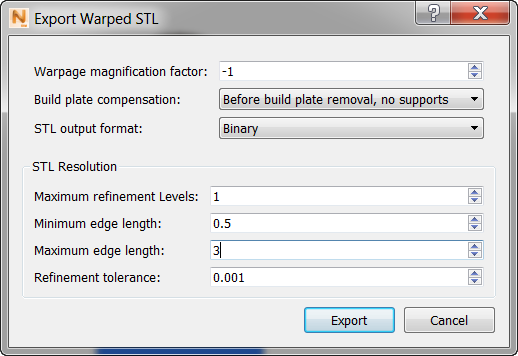
Warpage magnification factor
Applying the right value for this factor might require a few iterations. A positive warpage factor results in a warped STL file, which can be used for mechanism fit. A negative warpage factor results in a compensated STL file, intended to eliminate distortion. You can also specify which increment the warped STL file represents: before build plate removal (with or without supports), or after build plate removal.
Maximum refinement levels
Values above 2 are often excessive, resulting in slower file generation and a larger STL file.
When you click Export, two files are exported to your project folder:
- <part_name>_warp.stl
- <part_name>_warp.out, a text file that records numeric values about the simulation