 This feature is available in the Extras menu or in the Extras submenu of the context menu of a part. It creates a new shell on the basis of the selected part. Depending on the parameters you enter in the dialog box, you can create a hollow part, an inner offset or an outer offset or a hollowing shell of the original, either as a three-dimensional mesh or as a sliced part.
The shell thickness determines the distance between the outer skin of the original part and the new shell. Every point of the new shell will have that distance to the original. That means that, for example, corners and edges are rounded off, when you make an outer offset.
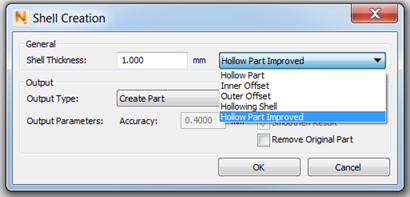
The dialog box for creating shells
A hollow part is the original part combined with a hollowing shell inside (see also Hollowing shell).
Hollow Part Improved has the same functionality as hollow part but works on an improved algorithm that should get you better results for most configurations. In case of not optimal results it is always recommended to try both modes.
An inner offset of a part is a new, correctly oriented part within the original. Its shape is based on the original part, only smaller, according to the shell thickness.
An outer offset creates a part based on the original with a specified distance of the skins, only that it is exceeding the original in size, seemingly enclosing that part.
A hollowing shell is an inverted part based on the shape of the original part. It is placed within the original part and has a negative volume. By merging the original and the new part, a hollow part can be created.
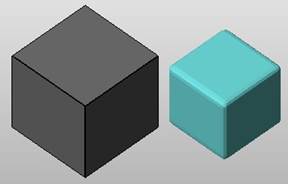
Inner offset (right) of a box
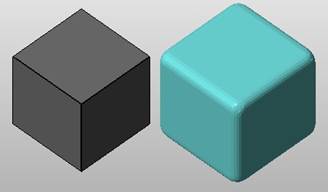
Outer offset (right) of a box
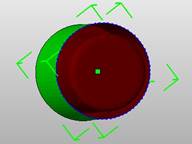
Cross section of a cylinder with hollowing shell inside
As output type you can either create a three-dimensional part or a slice file. The creation of a slice requires much less calculation time. If you create a part, you can set the accuracy of the new shell. A very low value means that a finer triangle mesh may be created. This results in very precise offsets, but requires longer calculation time, both for the creation and for further handling of the part. If the result is smoothed, the corners of the new shell are rounded off and a better triangle mesh is created.
The option Create Slice exports the respective object as a slice file and inserts it into the Slices section of your project. Therefore, no triangle mesh has to be calculated. You can edit the layer size, according to your needs, and the roundness of offsets.
If it is necessary for the offset to form a curve, the angle you specify for the roundness is the maximum angle of two adjacent corner points of the offset, with the original corner point as apex of the angle. Consequently, the offset curve becomes rounder and more precise, if the maximum angle is reduced.
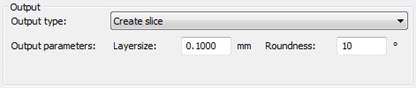
If you create a slice instead of a part, you can set output parameters for layer thickness and roundness.