This command is applicable to Autodesk Nastran In-CAD for Inventor only. It is not available within SOLIDWORKS.
Components created using the Inventor Frame Generator are listed within the
Structural Members dialog. From there, you can choose whether to represent each member using beam elements or solid elements. To access this dialog, click
Prepare Structural Members in the
Autodesk Nastran ribbon tab.
Structural Members in the
Autodesk Nastran ribbon tab.
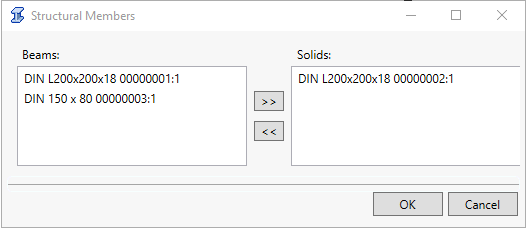
- Beams: List structural members in the box on the left (Beams) to represent using beam elements.
- Solids: List structural members in the box on the right (Solids) to represent them using solid elements.
- Use the double-arrow keys in between the two list boxes to move selected members from one list to the other.
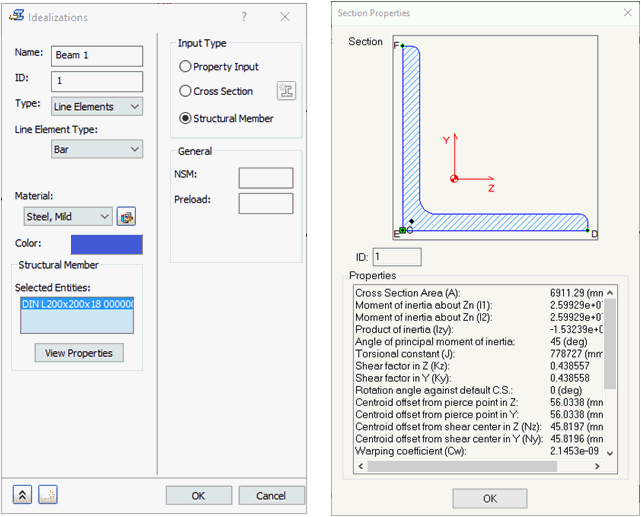
The appropriate entries are created in the Solids and/or Beams sub-branches under Idealizations in the Autodesk Nastran Model Tree. Click View Properties to access the Section Properties dialog for structural members.
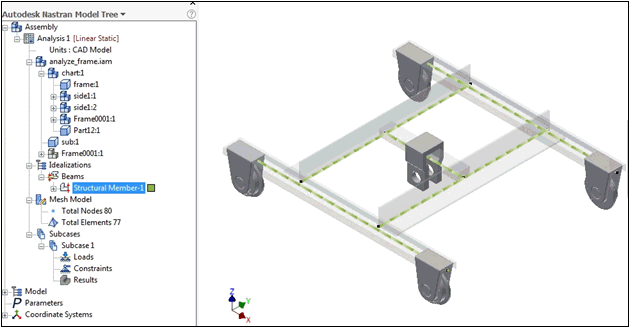
The following image shows an example of an Inventor model with members created using the Frame Generator. The members are represented by beam elements, as seen in the model tree: