The Replace and Transfer workflow transfers devices and equipment from a removed structure (like a pole) to a new structure. The purpose is to steamline the workflow required to replace specific existing features while transferring others as a single process.
To configure the statuses for the workflow, see General Layout Options.
- Click Home tab
 Analysis panelReplace And Transfer
  .
. - Select one or more features to be replaced and press Enter.
- Choose whether to replace the contained features. The following options are available:
- Yes: Replace all the contained features.
- No: Don't replace any of the contained features.
- Select: Select the features to be replaced from the window below.
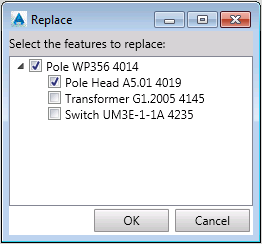
- Specify the position where the new feature is to be placed.