You can edit the size, position and angle of an elliptical shaped vector.
To edit an ellipse:
- Click the
Select
 button to enter selection mode.
- Select the vector.
Note: If you are working inthe 3D view, click the Toggle Vector Visibility
 button on the
3D View toolbar to display vector artwork.
button on the
3D View toolbar to display vector artwork.
- Right-click the vector and select
Edit Ellipse in the context menu. The
Tool Settings: Ellipse Creation panel is displayed and the vector is shown as a preview image with handles for editing its size, rotation, and position.
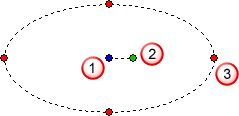
 Centre Point
 Rotation Handle
 Resizing Handle
- Modify the vector using the mouse or the panel.
- Right-click the 2D or 3D views to exit ellipse-creation mode.
Note: You can also edit vectors using the
Transform or
Node Editing modes.