Connections
Visualizing connections
A connection is an FBX SDK data structure which manages the two-way relationship between FBX objects and/or FBX properties. To guarantee the consistency of connections within the FBX SDK, the actual datastructure is not publically exposed. Instead, connections can be manipulated using the FbxObject and FbxProperty connection-management methods such as: FbxObject::ConnectSrcObject(), FbxObject::ConnectDstObject(), FbxProperty::ConnectDstObject(), FbxProperty::ConnectSrcProperty(), etc.
Connections can be visualized as a destination and source hierarchy of FBX objects and properties.
- object-property connections: Properties are contained within objects as sources. Calling
FbxObject::GetSrcProperty()will return the object's source property at the given index. Symmetrically, callingFbxProperty::GetDstObject()will return the property's destination object. - object-object connections: Parent-child relationships among objects use connections (for example: the node hierarchy of a scene). Typically, an object's children are sources, and are accessed using
FbxObject::GetSrcObject(). An object's parent is a destination, and is accessed usingFbxObject::GetDstObject(). - property-property connections: Parent-child relationships among properties also use connections (for example: the property hierarchy of
FbxIOSettings). Typically, a property's children are sources, and are accessed usingFbxProperty::GetSrcProperty(). A property's parent is referred to as a destination, and is accessed usingFbxProperty::GetDstProperty().
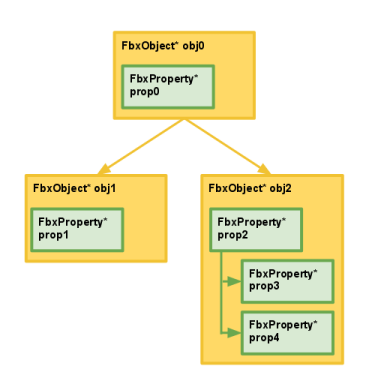
The destination and source connections in the diagram above are illustrated in the following code samples.
Accessing the source objects of
obj0:// ... Assume obj0 has been initialized to reflect the diagram above... // For illustrative purposes, count the number of source objects connected to obj0. int numSrcObjects = obj0->GetSrcObjectCount(); // numSrcObjects = 2 // Access the two source objects connected to obj0 // Note that obj0->GetSrcObject(0) is equivalent to calling obj0->GetSrcObject() FbxObject* obj1 = obj0->GetSrcObject(0); FbxObject* obj2 = obj0->GetSrcObject(1);Accessing the source property of
obj0:// ... Assume obj0 has been initialized to reflect the diagram above... FbxProperty* prop0 = obj0->GetSrcProperty();Accessing the destination object of
obj1:// ... assume obj1 has been initialized to reflect the diagram above... FbxObject* obj0 = obj1->GetDstObject();Traversing the hierarchy in an ad-hoc manner starting from
obj2:// ... Assume obj2 has been initialized to reflect the diagram above... // Access prop2 using obj2. FbxProperty* prop2 = obj2->GetSrcProperty(); // For illustrative purposes, count the number of source properties of prop2. int numSrcProperties = prop2->GetSrcPropertyCount(); // numSrcProperties = 2 // Access prop3 and prop4, which are sources with respect to prop2, // respectively indexed at 0 and 1. FbxProperty* prop3 = prop2->GetSrcProperty(0); FbxProperty* prop4 = prop2->GetSrcProperty(1); // Access obj0 using obj2. FbxObject* obj0 = obj2->GetDstObject(); // Access prop0 using obj0. FbxProperty* prop0 = obj0->GetSrcProperty(); // Access obj1 using obj0. // Here, we assume obj1 is indexed at 0, whereas obj2 is indexed at 1. FbxObject* obj1 = obj0->GetSrcObject(0); // Access prop1 using obj1. FbxProperty* prop1 = obj1->GetSrcProperty();
Connecting objects and properties
The concept of connections in the FBX SDK allows for instances of FbxProperty to be dynamically added to a FbxObject. This gives you the flexibility of defining your own datatype, wrapping it into an FBX property via the FbxProperty::SetUserDataPtr() member function , and binding that property to an FBX object via the FbxObject::ConnectSrcProperty() member function.
The FbxCollection class also relies on connections to organize groups of objects into a hierarchy. For example, the FbxScene class contains a hierarchy of FbxNode objects, accessible via FbxScene::GetRootNode().
Before delving into the use of connections in relation to nodes (FbxNode) and node attributes (FbxNodeAttribute), it is recommended that you familiarize yourself with the scene graph organization of the FBX SDK. Consult the ~{ Nodes and the Scene Graph }~ section for more information. However, if you are feeling adventurous, the concepts laid out below will give you an intuition of how the scene graph is structured using nodes and their attributes.
As a brief introduction, the hierarchy of FbxNodes in a FbxScene is used to specify the geometric transformation stack. The classes which inherit from FbxNodeAttribute, for example, FbxMesh, FbxCamera, and FbxLight describe all the elements in the scene. A FbxNodeAttribute is connected to a FbxNode to specify where the mesh, camera, or light exists in the 3D space.
"Object-Object" connection example: Parent-child relationships between nodes in a scene
The parent-child relationships between nodes in a scene make use of object connections. Consider the FbxNode::AddChild() method, which adds a child node to the parent node on which the method is called:
    // ... Assume lScene has been initialized as a FbxScene*,

    // Obtain the root node of a scene.
    FbxNode* lParentNode = lScene->GetRootNode();

    // Create a child node.
    FbxNode* lChildNode = FbxNode::Create(lScene, "child");

    // Add the child node to the root node.
    lParentNode->AddChild(lChildNode);
The following connections will be made:
- The child node will be a source object of the parent node.
- The parent node will be the destination object of the child node.
lParentNode is a source object of lScene. Thus, lScene is the destination object of lParentNode.
The ~{ Merging two scenes }~ topic explicitly manipulates the connections between nodes to merge the contents of two scenes.
"Object-Object" connection example: Nodes and node attributes
A FbxNode's relationship to a FbxNodeAttribute is normally created by invoking FbxNode::SetNodeAttribute(). As such, an instance of FbxMesh (which inherits from FbxNodeAttribute) can be bound to a node in a scene. In this case:
- The
FbxNodeAttributeis a source object of theFbxNode. - The
FbxNodeis a destination object of theFbxNodeAttribute.
Materials (FbxSurfaceMaterial) are also connected as source objects to FbxNodes. One node can be connected to many materials, and one material can be connected to many nodes (to reduce memory usage). Observe, however, that FbxSurfaceMaterial is not a subclass of FbxNodeAttribute.
"Object-Property" connection example: Nodes and transformations
As mentioned in the ~{ FBX properties }~ subsection, the local transformation data of a FbxNode is defined as a FbxPropertyT, parametrized with the FbxDouble3 datatype. In this case:
- The
FbxPropertyTreturned byFbxNode::LclTranslationis a source property of thatFbxNode. - The
FbxNodeis a destination object of thatFbxPropertyT.