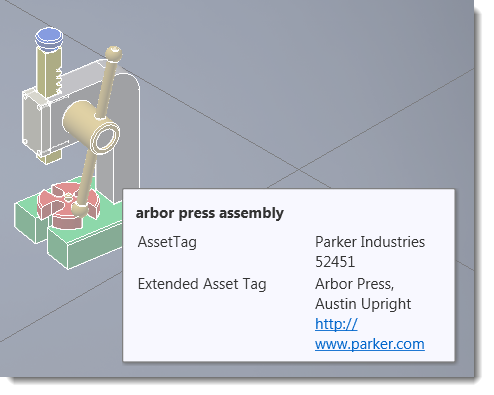
It is common practice to assign an identifier or "brass tag" to a corporate asset. An asset tag is applied to a published asset or an imported model/assembly after it has been placed into a 3D factory layout. You assign a tag from the AssetTag fields in the Factory Properties browser. Once defined, you can view the tag by hovering the cursor over the asset in a layout.
Inventor Factory also provides the ability to add a descriptor when defining asset properties. A descriptor can contain additional information about an asset, such as type, part number, flow rate, etc. To learn more, see Defining Asset Properties.
Both asset tags and descriptors can contain multiple lines of alphanumeric text. The Search command helps you locate all assets or placed components with specific asset tag or descriptor character strings.
What happens to asset annotations in AutoCAD Factory and Navisworks?
As in Inventor, annotations appear when you hover the cursor over an asset in Navisworks Factory and AutoCAD Factory.
In AutoCAD, you can use the standard AutoCAD block attribute editing commands like EATTEDIT, -ATTEDIT, and BATTMAN to edit the asset annotations. Use the FIND command to help you locate asset tag and descriptor text.