This release introduces new features and enhancements that expand the range of capabilities, enhance solution accuracy, and reduce time to solution.
The Autodesk Moldflow Synergy - User Interface and Autodesk Moldflow Insight - Solvers applications are licensed and installed separately. To complete the product installation, install both applications. Before you run the product for the first time, check you have installed, and can access, the Autodesk Network License Manager.
Network License Manager
NLM can be installed from the product installer, using the Tools & Utilities option. If an earlier version of NLM is already installed on the server, uninstall that version. Install the new version into the folder where the old version was located. NLM must configure the license servers before any products can obtain licenses and start running. NLM can be installed either before or after the products that use it.
Simulation Job Manager
The Moldflow Job Manager has been retired and replaced by the Simulation Job Manager. The Simulation Job Manager is a utility for managing communication between the desktop and your Autodesk Account, and is included in the installation executable for each Simulation product. The Simulation Job Manager manages the computational components of your analysis, and provides similar functionality to the Moldflow Job Manager, but also provides you with access to your Autodesk Account. You still launch jobs from the ribbon, or the Study Tasks pane.
With the introduction of the Simulation Job Manager you can now send the computational components of your analysis to the cloud, provided that you have purchased cloud credits. You also add and configure remote servers using the Simulation Job Manager, and set up batch jobs from within the Simulation Job Manager.
Known issues and warnings
- Update Universal C Runtime (UCRT) component from Microsoft
-
Warning: Make sure that you have updated the Universal C Runtime (UCRT) component from Microsoft. Unless you have installed Update for Microsoft Windows (KB3118401), or later, you may see an impact on your ability to interact with your results.
- Memory usage
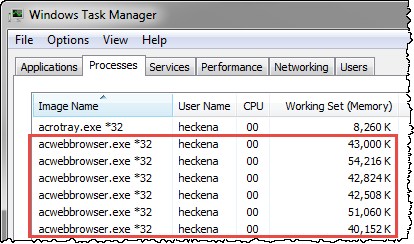
- Each time you call a license, the new licensing framework launches three child processes to enable communication and to query data from secure data storage. Each child process consumes between 40-60 Mb of memory. When you open the Windows Task Manager, you will see three instances of acwebbrowser.exe, for EVERY license call. If you are running multiple concurrent analyses, you will see three instances of acwebbrowser.exe for each analysis. For example:
- Synergy: 3 instances of acwebbrowser.exe ~150 Mb
- Each running analysis: 3 instances of acwebbrowser.exe ~150 Mb per analysis, such as Cool, or Fill+Pack, or Warp.
Make sure your computer has sufficient memory to host these processes.