Use this page to specify a holder for the electrode.
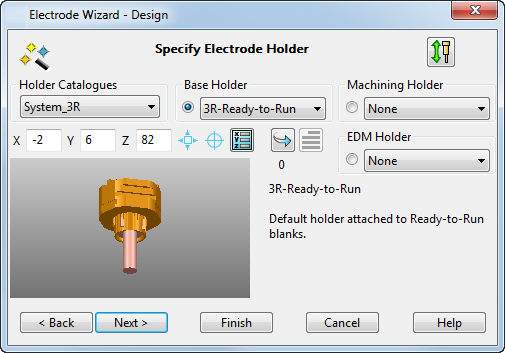
To specify the holder:
- Holder Catalogs — Select a catalog. The
default catalog for the current blank is selected if one is specified.
To set up your own catalog of holders, contact technical support.
- Base Holder — This holder clamps directly onto the blank. The default holder for the current blank is added if one is specified.
- Machining Holder — This holder is fixed to the Base Holder during the machining process and is optional.
- EDM Holder — Same as the
Machining Holder, but is used during the EDM process.
You can control what is displayed in the viewer by selecting the options next to the drop-down holder lists. Usually there is a view of the electrode base and the current base holder. If you select to view a Machining Holder or EDM Holder, the blank, base holder, and the selected holder are displayed.
When you select Machining Holder or EDM Holder in the list, the Base Holder option is no longer available to prevent confusion.
- Use the following options to define the attachment point of the holder to the base:
- X, Y, Z — Edit the values in these boxes to specify the position of the attachment point, relative to the active workplane.
 Centre on base — Select this option to use the centre of the electrode base as the attachment point. This is the default position, and this option is unavailable if the default is already being used.
 Centre on datum — Select this option to use the X and Y values of the electrode datum. The Z value is defined as the top of the base, ensuring correct contact between the holder and base. This option is unavailable if the attachment point is already centred on the electrode datum.
 Position — Select this option to open the
Position dialog. Use this dialog to specify the position of the attachment point.
Position — Select this option to open the
Position dialog. Use this dialog to specify the position of the attachment point.
Note: The holder datum takes precedence over the electrode datum. Therefore the attachment position you define for the holder will affect the datum included in the Electrode setup sheet and EDM data-transfer files.  Rotate — Click this button to rotate the selected holder by 90
 relative to the blank. This adjusts the C angle used during electrode burns. The current C angle value is displayed below the button. If the base holder is selected, the base holder rotates. If a
Machining
or
EDM Holder is selected, both the selected holder and the base holder rotate.
relative to the blank. This adjusts the C angle used during electrode burns. The current C angle value is displayed below the button. If the base holder is selected, the base holder rotates. If a
Machining
or
EDM Holder is selected, both the selected holder and the base holder rotate.
 and
and
 — Display a graphic or text description in the lower right window of the wizard.
— The bitmap (if available) of the selected holder is displayed. Select this option to display the text description.
— Displays a text description of the selected holder. Select this option to display the graphic of the holder.
Note: This is only available for holders in user-defined catalogs.
— Display a graphic or text description in the lower right window of the wizard.
— The bitmap (if available) of the selected holder is displayed. Select this option to display the text description.
— Displays a text description of the selected holder. Select this option to display the graphic of the holder.
Note: This is only available for holders in user-defined catalogs.- Next — Displays the General Options page of the Electrode Wizard - Design.