Learn how to add sections to the list of available sections in the project.
- Continue working in your project, or open the project Frame_3D_Preferences.rtd.
The Tutorial files are located in C:\ProgramData\Autodesk\Examples\Tutorials.
- Click
 (Geometry
  Properties Sections).
The Section dialog opens.
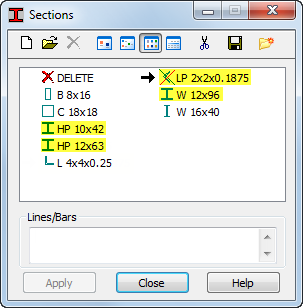
- Check presence of the following sections: W 12x96, HP 10x42, HP 12x63, and LP 2x2x0.1875.
- If the sections specified above are not available in the list, click
 (New section definition).
 - To add the W 12X96 section, set the following parameters as follows:
- Section type: Steel,
- Database: AISC 14.0,
- Family: W,
- Section: W 12x96.
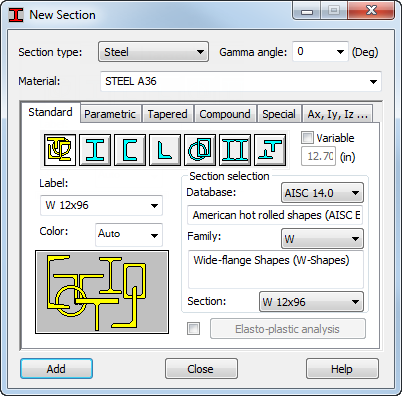
- Click Add.
- Repeat this process for the following sections: HP 10x42, HP 12x63, and LP 2x2x0.1875.
Note: For all sections, use the AISC14.0 Database, and Steel as the Section type.
- Close the New Section dialog. The additional sections appear on the list as shown below:
- Close the Sections dialog.