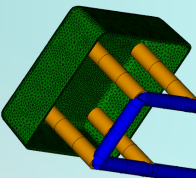
To manually model a bubbler, create a curve specifying the bubbler elements and then mesh the curve.
Note: As an alternative, generate bubblers at time of meshing by extracting center lines from an imported CAD model of the cooling system, and applying the property of
Bubbler
to the appropriate curves
It is assumed that:
- The cooling channel curves have been defined and a bubbler is to be added to one or more of these curves.
- It is also assumed that there is not a node on the cooling channel curve where the bubbler is to be created.
Note:
For a Cool (BEM) analysis, when cooling elements pass through an insert that has different thermal properties to the rest of the mold, the insert material needs to be specified and applied to those elements.
Nodes may need to be placed on the cooling channel curve at the boundary of the insert so that affected elements and the insert align. Apply a different property to the impacted elements so that the insert material can be easily applied.
- Click
 () and place a node on the circuit indicating the base of bubbler.
- Click
 () and create a line from the node towards the part. End the curve a distance from the part that is at least equivalent to the outer diameter of the bubbler.
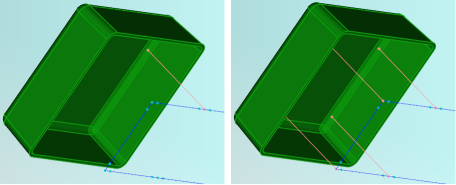
- Select the curve that represents the bubbler. Click .
- Enter the bubbler dimensions in the Bubbler Surface Properties tab of the Bubbler dialog. To prevent excessive pressure in the bubbler, the ratio of inner diameter to outer diameter should be about 0.7.
- Enter 1 for the Heat transfer effectiveness (HTE).
- Select the mold material from the options in the Mold Properties tab of the Bubbler dialog. If the bubbler is encased in a different material to the rest of the mold, it is important to specify that material.
- In the Name box, enter an appropriate name for the bubbler, then click OK twice.
- Right-click on the Mesh icon task in the Study Tasks pane and select Define Mesh Density . Set the mesh density to 2.5 times the diameter of your bubbler. Click Apply and OK.
- Click
 (), deselect the check boxes, then click
Mesh Now.
(), deselect the check boxes, then click
Mesh Now.