Import and use parts whose shape are described parametrically rather than by a triangle mesh
Netfabb imports and handles CAD parts in a non-destructive fashion: The part's parametric information is kept and can be sampled freshly when needing to derive new information from the part's shape, such as when generating slice contours or determining support clusters.
Highlights
- Always choose the appropriate degree of tessellation for the task at hand.
Generating support and slicing, for example, have very different requirements in triangle count. While support generation does not require a high-res mesh to generate structures, you cannot afford the same frugality when it comes to slicing and creating the toolpaths that will eventually make up your very product.
- Keep parametric data for geometric operations: Move, scale, rotate the part as needed.
- Avoid or diminish common issues requiring extensive repair including stitching, wrapping, and closing of holes, that may occur due to the import process.
- Save your project natively in Netfabb, including parametric parts.
- Keep file sizes low by avoiding permanent conversion to mesh.
- Make adjustments to a part already processed in Netfabb without losing the work done there.
- Work on parametric and mesh parts in the same project.
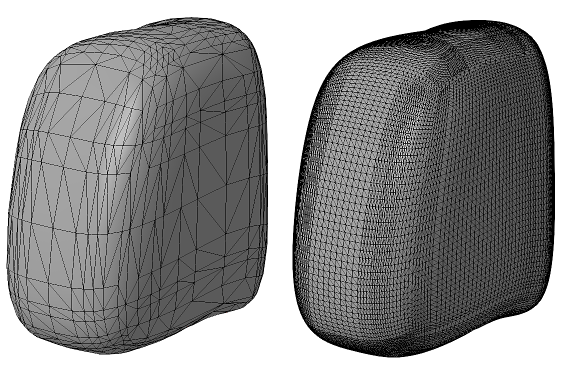
The same parametric part, tessellated with two different presets
Your workflows in Netfabb will remain largely unaffected as long as you do not change part shape by operations such as cutting or mirroring. When attempting to perform such actions, you will be warned with a dialog to tell you that this will drop the parametric dataset from the loaded part. Dropping the parametric dataset fixates the current tessellation permanently into the part's mesh. You may also force dropping the parametric dataset manually.
 Making Meshes Parametric
Netfabb can convert meshes into parametric models by remeshing and converting them using the BREP approach. BREP stands for boundary representation.
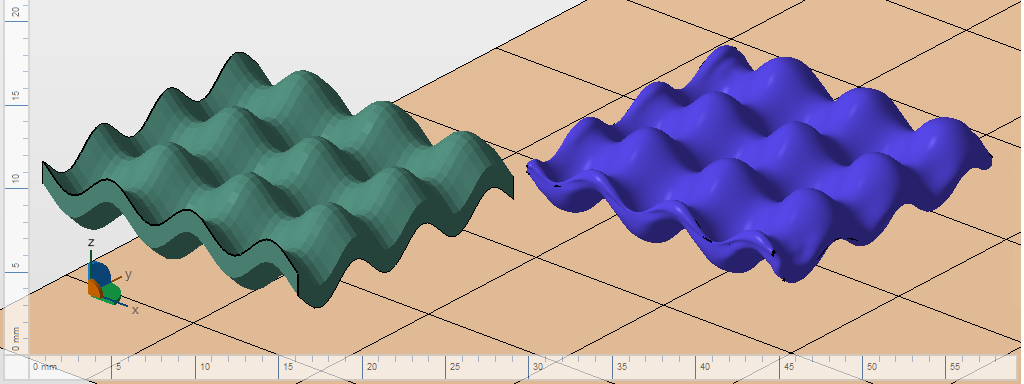
The function surface from the part library as a mesh (left) and its conversion into a BREP parametric part (right).