Using Controllers
Get information on using controllers in a VRED collaboration session.
Since not all controllers have buttons in the same location, when in VR, there is a controller mode with displayed tooltips. Use the tooltips to locate tools.
NOTE For entering a collaboration session, two controllers are required.
For a list of supported VR devices, see VR Requirements.
What Tools Do the Controllers Have
For the location of these tools, please refer to these images:
HTC Vive, StarVR, and VRHero/VRgineers XTAL

Oculus Rift

WinMR
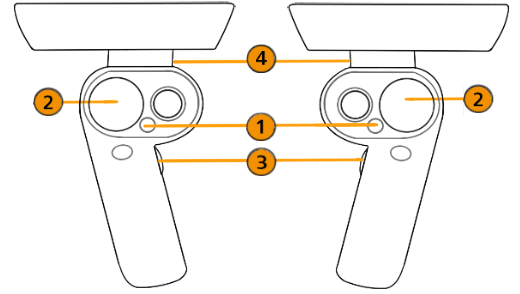
- Tools Menu
- Teleport
- Tooltips
- Pointer
 Tools Menu
Press this button to display the Tools Menu or hide it. See Tools Menu for more information.
 Teleport
Use to teleport yourself to different places in a scene by touching the controller pad to cast a teleport arc, then pressing the pad to teleport. Teleport to different locations in the scene, into a car, or onto a car. See Teleporting for more information.
 Tooltips
Press this button to turn the displayed controller tooltips on or off.
 Pointer
Press this to activate a beam and use it to point and indicate areas of interest.
Custom Controls
Use the following Python functions to switch the mapped interaction of the trigger and touchpad/thumbstick.
In vrImmersiveInteractionService, use setControlMode(ControlMode)
For ControlMode, you can use TriggerPointer or ButtonPointer.
For example, for the Vive controller, if you wanted the touchpad/thumbstick to be mapped to the pointer and the trigger to be teleport, you would use:
setControlMode(ButtonPointer) and setControlMode(TriggerTeleport).