Select Numbering Schemes to set which naming schemes are valid for use in your copy design configuration. You can also set the default numbering scheme.
Important: This topic is intended for Vault Workgroup and Vault Professional users. Vault Basic users should see Copy Design (Vault Basic).
Note: See Create Numbering Schemes for more information on creating and customizing numbering schemes.
- Open Copy Design. Note: If you are not already logged in, you are prompted to log into a vault. Enter your credentials and click OK.
- Click the Master Menu
 on the toolbar and select Numbering Schemes to open the Numbering Schemes dialog.
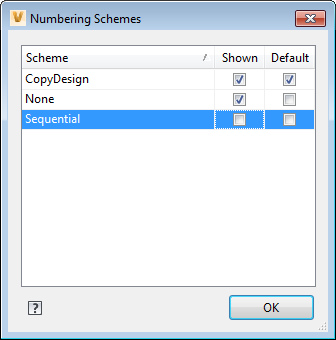
- Select the Shown check box for any numbering scheme you want to display as a view button in the Numbering Schemes Panel.
- Select the Default check box to set a Numbering Scheme as the default setting.
- Click OK.